
The ten-minute explanation
How VPNs work in plain English
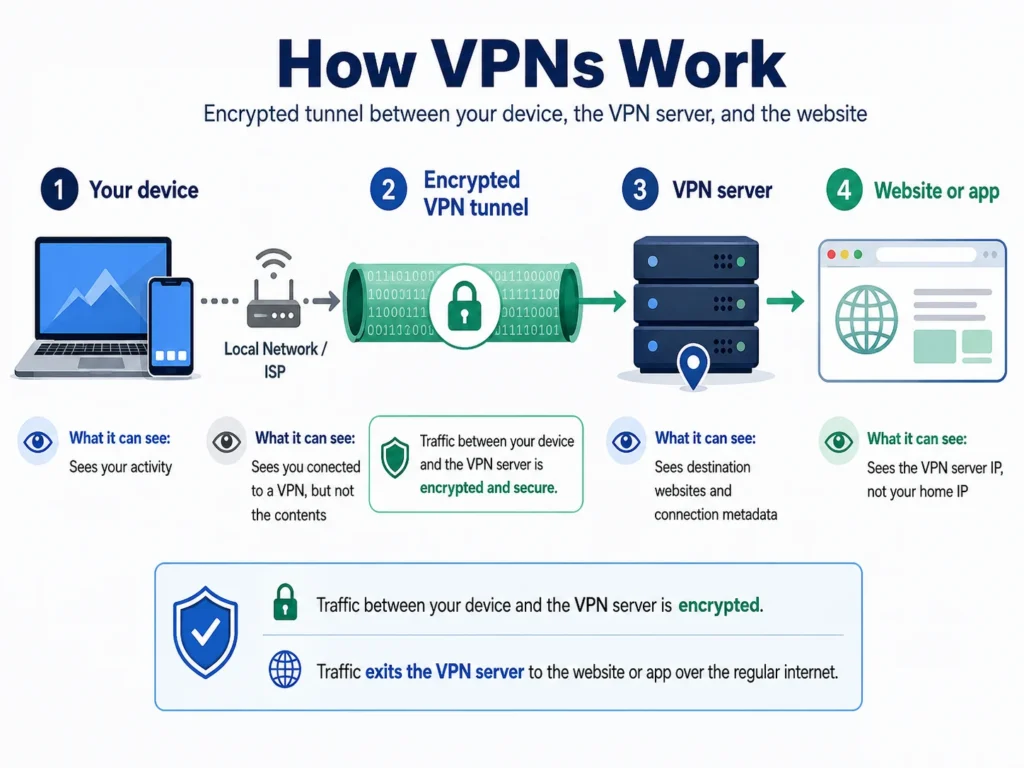
A VPN creates an encrypted tunnel between your device and a server run by the VPN provider. Your local network or ISP sees the tunnel but not the destinations inside it. The VPN server forwards your traffic using its own IP address, so websites see the server’s address instead of your home IP.
That simple mechanism explains what a VPN can protect, where the trust moves, and why it cannot make you anonymous. No technical background is needed for the walkthrough below.
Reviewed: August 2026 · Reading time: about 10 minutes
The starting point
What happens when you browse without a VPN
Understanding the ordinary connection makes the change much easier to see.
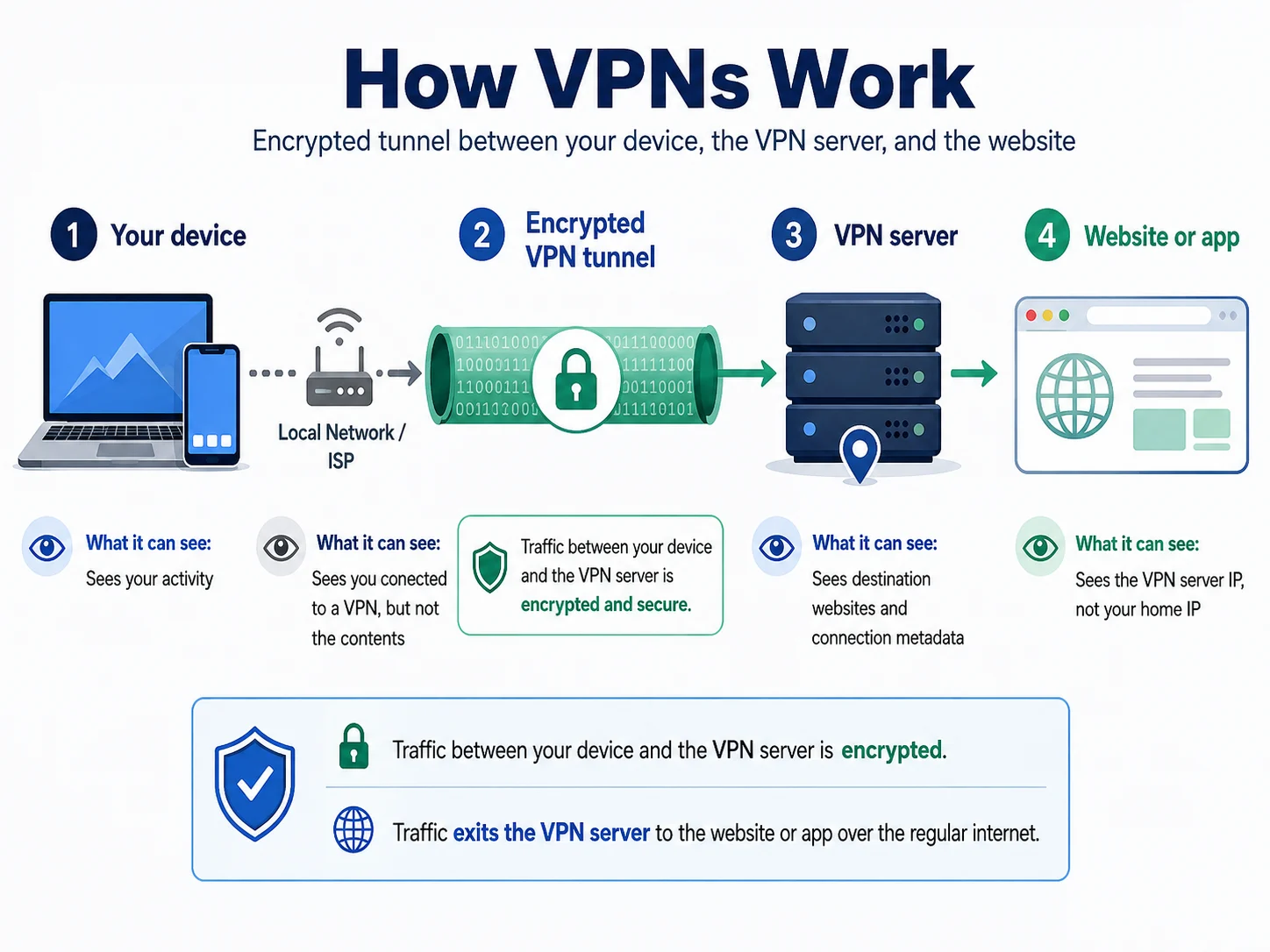
When you type a website address, your device first performs a DNS lookup: it asks a directory service to turn a domain such as example.com into a numeric IP address. By default, that request often goes to your ISP or the operator of the network you are using.
Your browser then connects to the destination. HTTPS encrypts page contents, passwords and form data in transit, but the network can still observe connection metadata. Depending on DNS and TLS configuration, it may infer or see the domain, timing, data volume and destination IP. The website sees the public IP assigned to your connection and can estimate a location from it.
| Information | ISP or network | Website |
|---|---|---|
| Sites you visit | Often visible or inferable | Sees its own visit |
| Page contents | Hidden by HTTPS | Visible to the destination service |
| Your public IP | Known; it assigned the address | Visible |
| Approximate location | Known | Inferred from IP |
| Timing and volume | Visible | Visible for its own connection |
Inside the tunnel
What a VPN actually does
Pressing Connect adds one encrypted stop between your device and the wider internet.
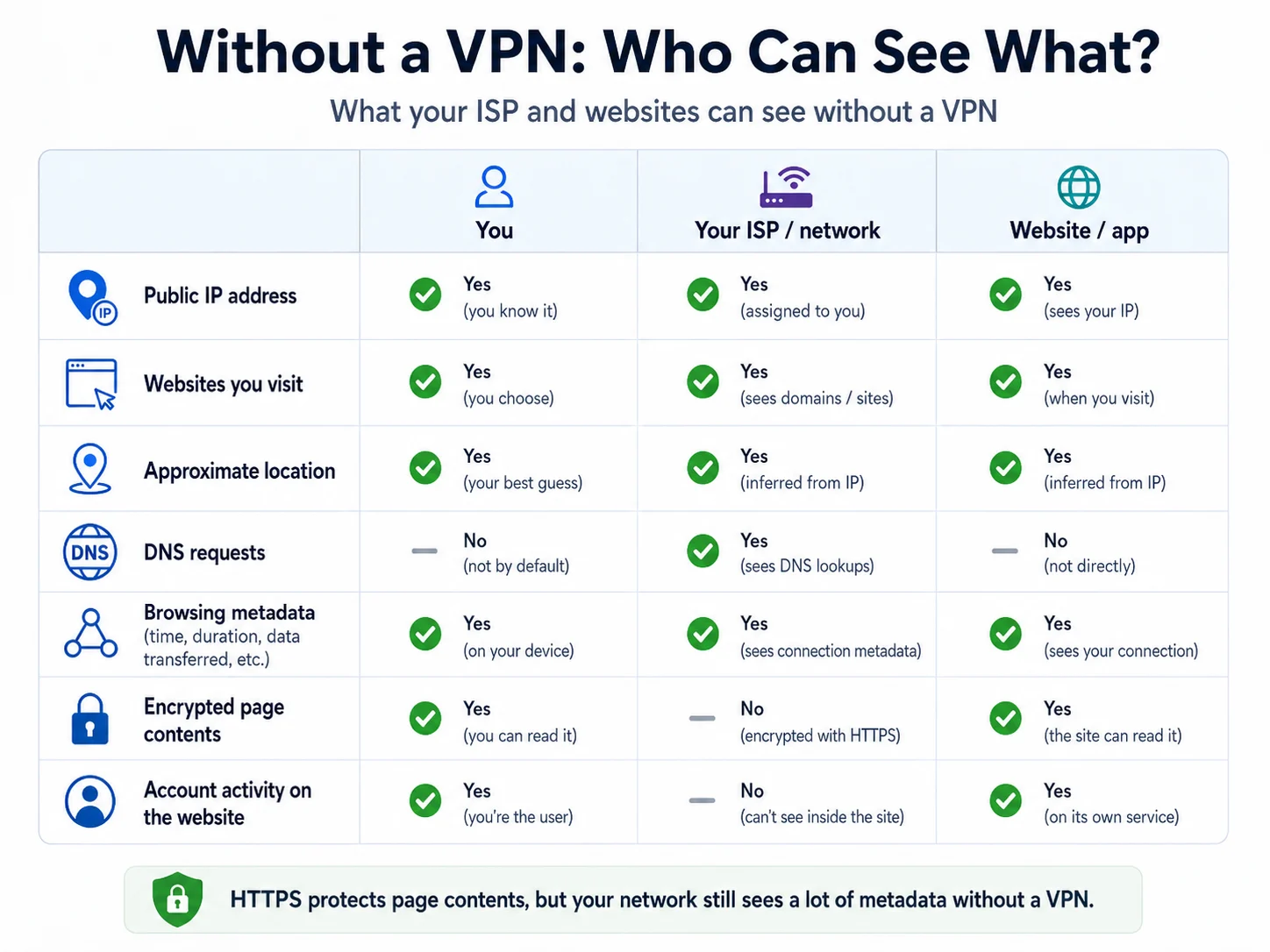
- The handshake: your device and the VPN server authenticate and establish short-lived session keys over the open network.
- Traffic is encrypted: modern protocols use established ciphers such as AES-256 or ChaCha20-Poly1305. The local network sees encrypted traffic to a VPN server, not the destinations carried inside.
- The server forwards the request: it decrypts the tunnel packet and sends the request onward using the server’s public IP rather than yours.
- The response returns: the website replies to the VPN server, which encrypts the response and sends it back through the tunnel for your device to decrypt.
The trust shift
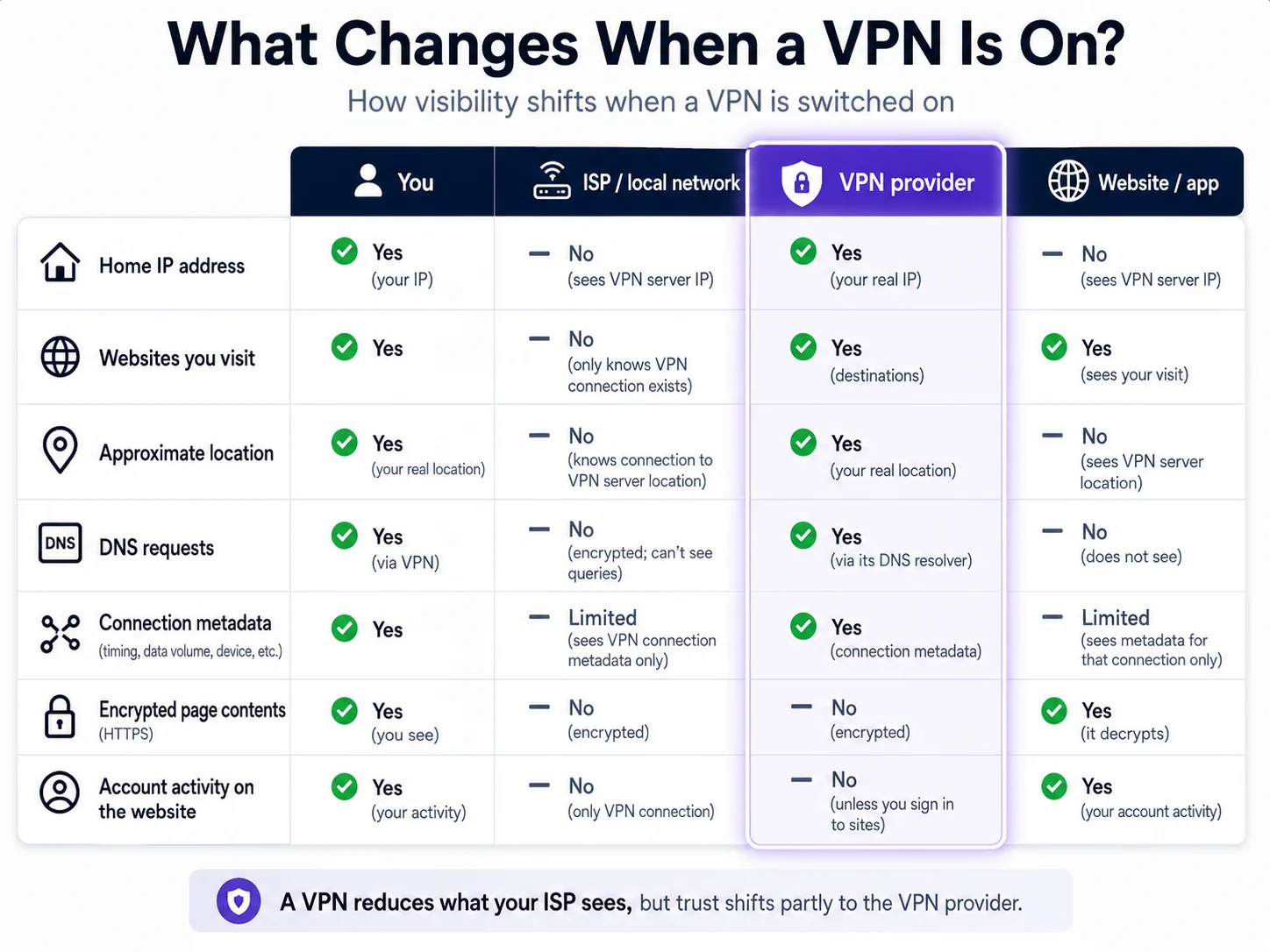
After connection, your ISP still knows your real IP and that you connected to a VPN, but it no longer sees the destinations carried inside a correctly configured tunnel. The website sees the VPN server IP. The VPN provider can see your incoming IP and destinations at the forwarding point, although HTTPS still protects page contents from the provider.
A VPN does not remove the trusted party; it changes that party. This is why ownership, independent no-logs assurance and transparent policies matter more than grand claims about “military-grade” protection.
The exit address
The VPN server and your IP address
Your public IP is the return address for the connection. It normally provides an approximate location—not a street address or personal name—but it is a persistent signal that services can use to connect activity.
With a VPN, websites see the exit server’s IP. Most subscribers share that exit address with many other users. Sharing helps activity blend together, but it also explains more CAPTCHAs: everyone shares the address reputation.
A dedicated IP is a paid alternative used only by one account. It reduces shared-reputation problems and can support allowlists, but a unique address is also easier to associate consistently with one subscriber. Neither choice is automatically more private in every threat model.
IPv6 needs attention too. If a device sends IPv6 traffic outside a tunnel that handles only IPv4, the real network address can leak. Reputable apps route or block IPv6 appropriately, and the practical verification is a leak test.
The commonly missed part
DNS and VPN leaks
Encrypting browser traffic is not enough if domain lookups still go to the ISP.
A DNS leak occurs when the tunnel carries the main connection but the device continues asking the local resolver which IP belongs to each domain. The ISP may then retain a useful list of destinations even though the page traffic is encrypted.
Proper VPN apps send DNS queries through the tunnel to resolvers controlled or selected by the provider. A leak test should show resolvers associated with the VPN, not the home ISP, hotel or café network.
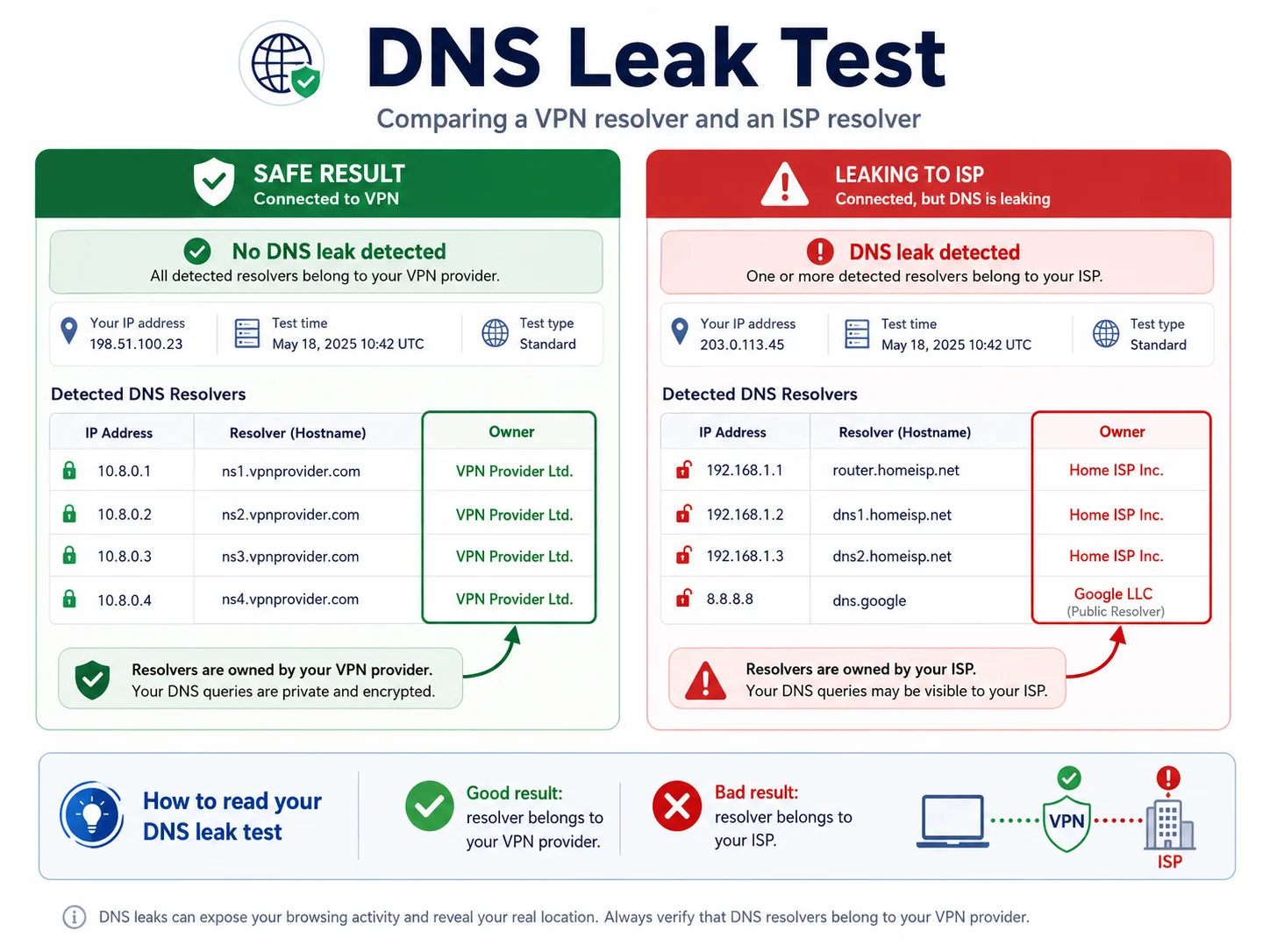
Some apps also block ads, trackers and known malicious domains at the DNS layer. That is useful filtering, but it is not a replacement for browser security, software updates or careful phishing checks.
Connection rules
VPN protocols, briefly
A protocol defines how the encrypted tunnel is established, maintained and reconnected.
| Protocol | Typical strength | Best fit | Trade-off |
|---|---|---|---|
| WireGuard | Fast and efficient | Everyday default | Newer ecosystem than OpenVPN |
| OpenVPN | Mature and flexible | Compatibility and manual setup | More overhead |
| IKEv2/IPsec | Good mobility | Switching between Wi-Fi and mobile data | May be blocked on some networks |
| Obfuscated options | Harder to identify | Restrictive networks | Extra overhead and variable availability |
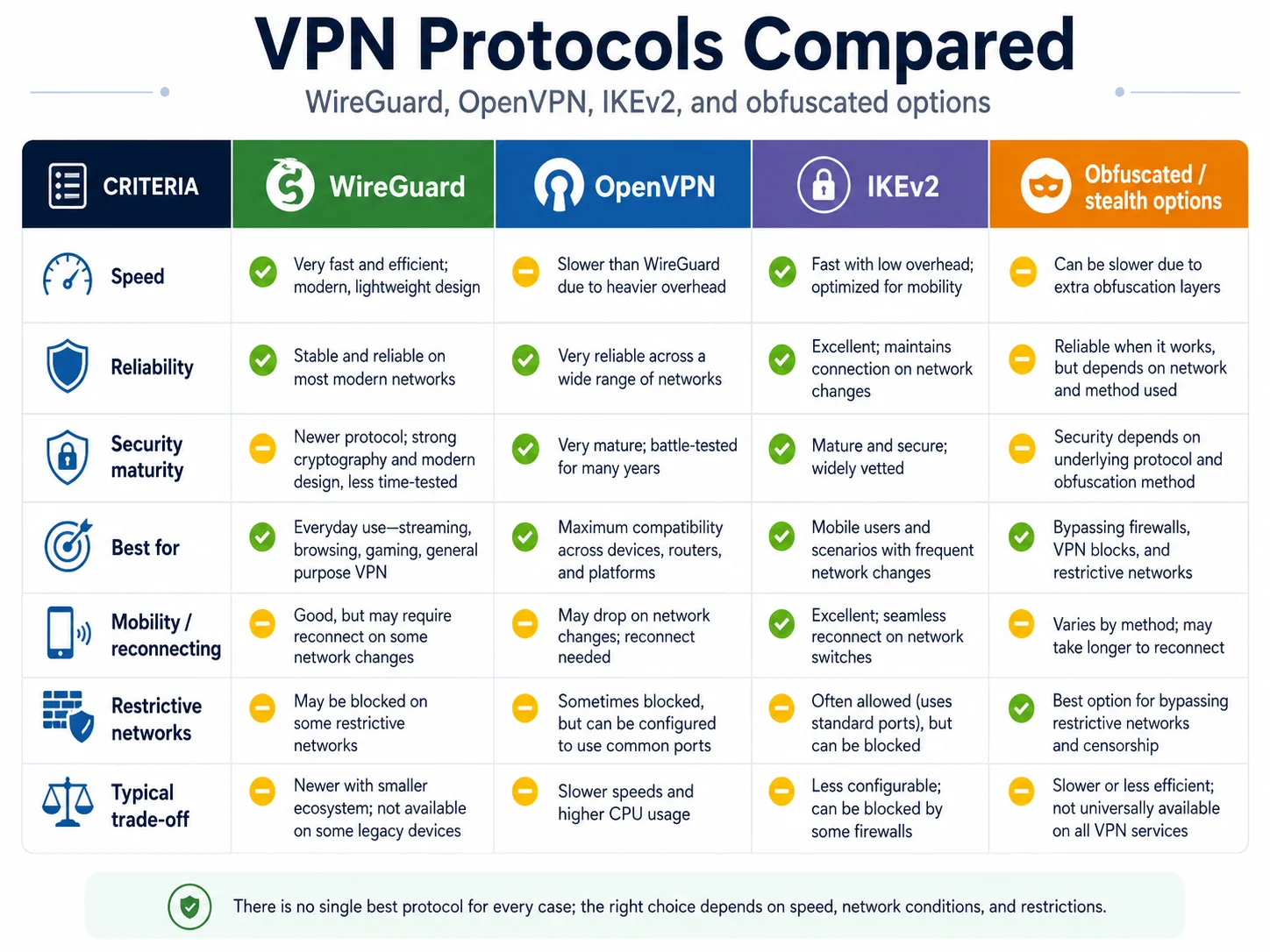
Practical rule: keep the app on its modern default unless the network refuses to connect. On a restrictive network, switch to the provider’s obfuscated or stealth option.
The safety net
What a VPN kill switch actually does
A kill switch is a firewall rule. The device blocks internet traffic that is not using the VPN interface. If the tunnel drops during sleep, a network change or unstable Wi-Fi, traffic stops instead of silently falling back to the open connection.
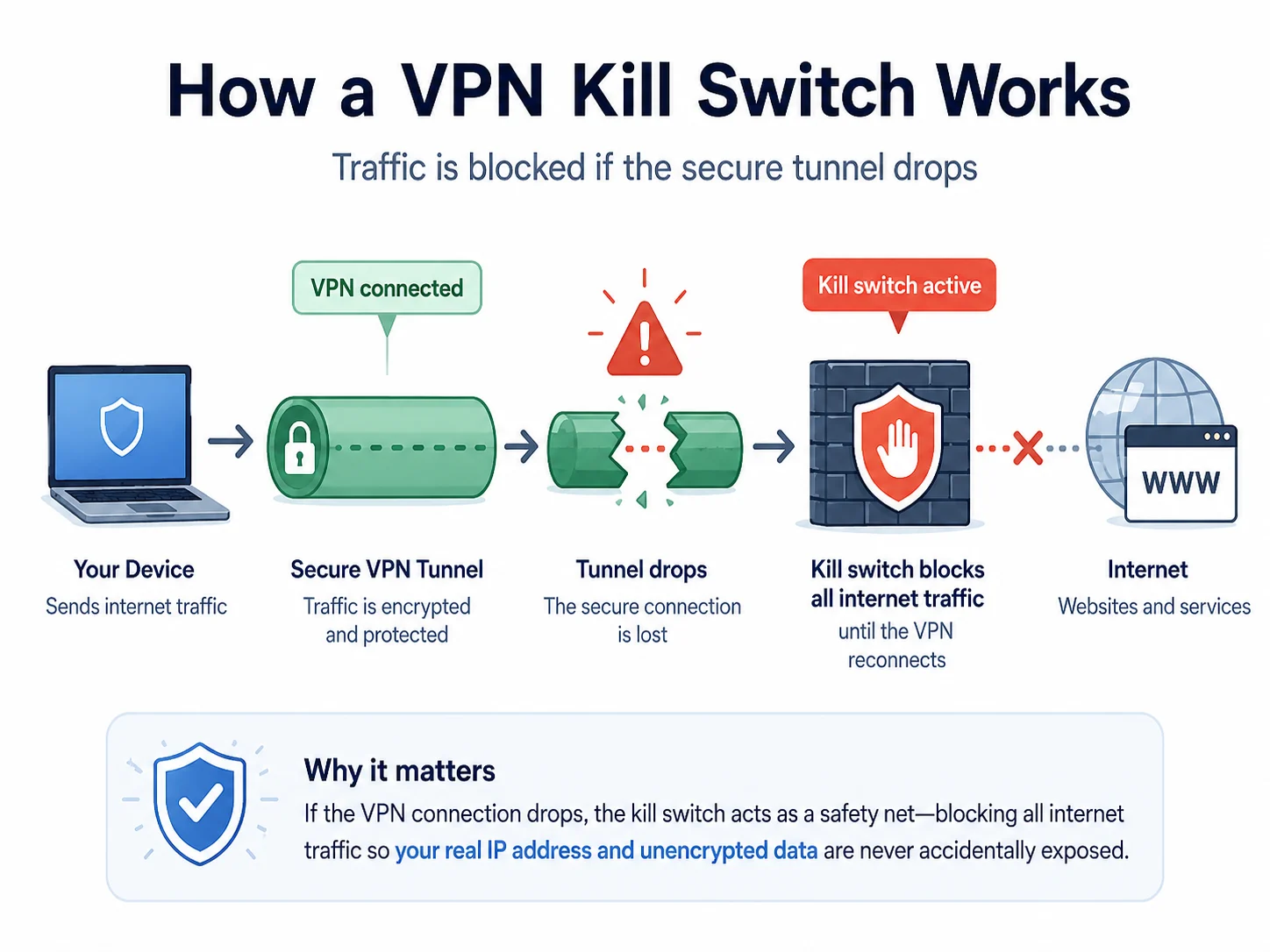
Test it after installation: connect the VPN, interrupt Wi-Fi and re-enable it. The device should have no usable internet during the gap, then recover through the tunnel.
The honest boundary
What a VPN cannot protect
- Anonymity: visibility shifts from the ISP to the provider. For a stronger anonymity design, the relevant tool is Tor.
- Logged-in activity: a service knows what its account does regardless of the IP address.
- Cookies and browser fingerprints: changing IP does not clear stored identifiers or change the browser’s distinctive characteristics.
- Phishing and malware: DNS filtering can stop known bad domains, not a new convincing page or an already infected device.
- Guaranteed streaming access: platforms detect VPN traffic and what works changes frequently.
- Legal permission: a tunnel does not change local law, and VPN use is regulated in some destinations.
Choosing a VPN means choosing who handles the visibility moved away from the local network. That is why independent evidence and a clear business model are essential.
Use cases
Who actually benefits from a VPN?
Clear benefit
- People who regularly use hotel, airport, café or shared Wi-Fi
- Readers who want to reduce ISP visibility
- Travellers who need services from their home region
- Users on networks that filter or block connections
Limited benefit
- People expecting full anonymity
- Anyone trying to hide account activity from the account provider
- Users expecting guaranteed streaming access
- Someone whose device is already compromised
There is no shame in deciding you do not need one. A VPN is a tool for specific network and privacy problems, not a general safety blanket.
See the model yourself
Three low-friction ways to try a VPN
Check your visible IP and DNS resolver before and after connection. The abstract model becomes obvious in minutes.
Zero-cost demonstration
Proton VPN Free
The funded free tier is enough to observe the IP change, run a DNS check and understand how the tunnel behaves without entering payment details.
Useful for
- No data cap
- No activity logging
- Simple first test
Limits
- One device
- Limited location choice
- Fewer paid features
Restrictive networks
NordVPN
A suitable example when obfuscation and a long independent assurance history are the deciding constraints.
Useful for
- Obfuscated connection options
- Broad platform support
- Repeated audit history
Limits
- Device cap
- Tiered extras
- Intro and renewal differ
Many devices
Surfshark
A practical example for households where simultaneous device limits matter more than another specialist feature.
Useful for
- Unlimited simultaneous devices
- Restricted-network mode
- Modern protocol support
Limits
- Platform differences
- Feature-heavy interface
- Intro and renewal differ
FAQ
How VPNs work: common questions
How does a VPN work in simple terms?
Your device encrypts traffic to a VPN server. The server forwards it using its own IP, so the local network cannot see the destinations inside the tunnel and websites see the server address.
Does a VPN hide your IP address?
It hides the home IP from destination websites. Your ISP and the VPN provider still know the incoming address, so it is hidden from sites rather than from everyone.
Can an ISP see what I do with a VPN on?
It sees a connection to a VPN server, timing and data volume. It should not see the destinations carried inside a correct tunnel, including DNS queries routed through it.
Is VPN encryption secure?
Modern ciphers such as AES-256 and ChaCha20-Poly1305 are considered strong. Realistic problems are misconfiguration, leaks, compromised devices and provider trust—not casually breaking the mathematics.
What can a VPN not protect me from?
Malware, phishing, cookies, browser fingerprinting, activity inside signed-in accounts and an already compromised device. It also cannot promise anonymity or permanent streaming access.
Methodology
How we checked this explainer
We separated protocol mechanics from provider marketing, checked claims against current Provider Hub evidence and used the diagrams as explanations—not proof of product performance. No speed result, price or provider interface is presented as first-party testing.
Next, see guide to choosing a VPN, return to the VPN Guides hub, browse VPN Basics guides, or apply the model to safer public Wi-Fi and the best VPNs for travel.