

The short answer
Best VPN for Mac: test the macOS limitations before you subscribe
NordVPN is the best VPN for Mac for most users because its direct-download app combines a mature interface, useful failure controls and strong protocol choices. Surfshark is the best value for households with many Apple devices. Proton VPN is the best privacy-first Mac option, with open-source software, modern protocols and transparent documentation of macOS limitations.
All three run natively on Apple Silicon. The real differences appear in system extensions, split tunneling, sleep-and-wake behavior and which app build you install. macOS imposes stricter networking boundaries than Windows, so a desktop feature advertised generically may not exist—or may work differently—on a Mac.
We treat those constraints as purchase criteria. A polished menu-bar icon is useful, but it does not replace a tested kill switch, reliable wake recovery or honest documentation.
Decision map
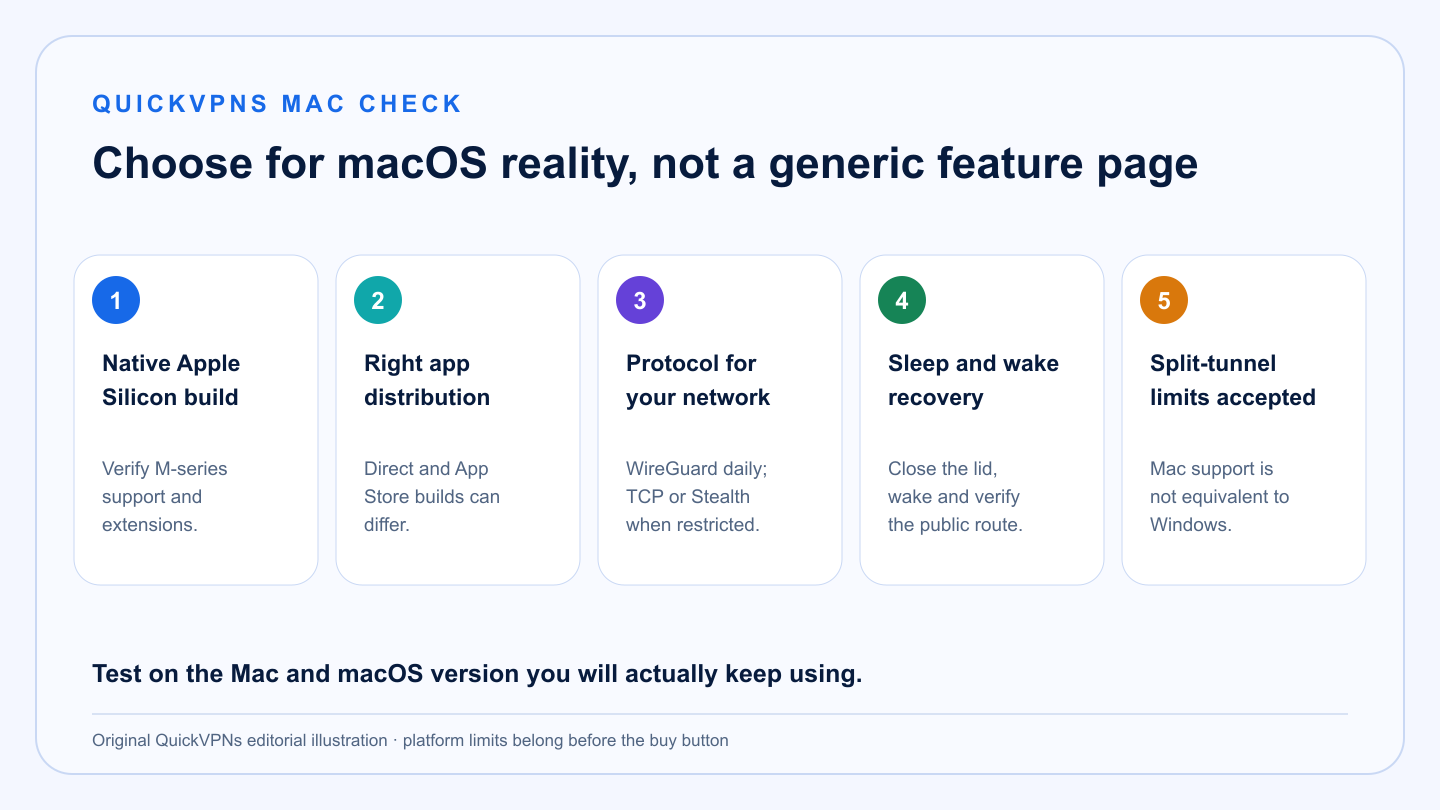
Five Mac checks that matter more than badges
Apple Silicon · app source · protocol · sleep/wake · split tunnel
Platform fit
What makes a good Mac VPN
The best choice fits the Mac you own and the workflow you actually use.
-
Native Apple Silicon build
M-series support should be explicit. Native software reduces translation overhead and avoids uncertainty around extensions.
-
The right distribution channel
Direct-download and App Store builds can have different features because of Apple’s sandbox and review rules.
-
Modern protocol options
WireGuard and provider variants are practical defaults; Stealth or TCP modes help on restrictive networks.
-
Sleep-and-wake recovery
MacBooks change networks and sleep frequently. The app should reconnect without silently leaving a direct route.
-
Honest split-tunnel limits
macOS support is not equivalent across providers. Decide whether app exclusions are essential before buying.
At a glance
Mac VPN comparison
Current platform behavior matters more than a provider-wide feature list.
| Criterion | NordVPN | Surfshark | Proton VPN |
|---|---|---|---|
| Best fit | Balanced everyday Mac use | Many Apple devices and value | Privacy and transparent controls |
| Apple Silicon | Native support | Native support | Native support |
| Split tunneling | No native app-level split tunnel on Mac | Bypasser on supported macOS versions | Experimental app exclusions with limitations |
| Protocol emphasis | NordLynx and fallback options | WireGuard, OpenVPN and IKEv2 options vary by build | WireGuard, WireGuard TCP, Stealth and Smart |
| Important caveat | Direct and App Store builds differ | Bypasser needs a system extension | Some Mac features are experimental or hardware-sensitive |
The shortlist
Best VPN for Mac picks
Choose the provider whose macOS trade-offs you can live with.
Best all-round Mac VPN
NordVPN
NordVPN is the most balanced Mac recommendation, particularly through the direct-download app. It provides the mature connection controls most users expect and uses NordLynx as the everyday high-speed path.
Mac buyers should understand that NordVPN has distributed different macOS builds. The direct version can expose controls that the App Store version does not. Download from the provider’s official Mac page, then check the current comparison before choosing a build. Native app-level split tunneling is not the reason to buy NordVPN on Mac; use browser-level exclusion only when that narrower solution is enough.
Strengths
- Native Apple Silicon support
- Mature direct-download Mac app
- Strong automatic protocol defaults
- Useful connection and failure controls
Trade-offs
- Direct and App Store builds can differ
- No native app-level Mac split tunneling
- Ten-device limit may constrain Apple-heavy homes
- Some extras depend on macOS version
Best value for Apple households
Surfshark
Surfshark is the commercial value pick for homes with several Macs, iPhones, iPads and TVs because one plan supports unlimited simultaneous connections.
Its Mac Bypasser can exclude applications on supported versions of macOS, but it requires a system extension and is not compatible with macOS Big Sur. That is still more native split-routing control than NordVPN offers on Mac, provided your operating system and security policy allow the extension.
Strengths
- Unlimited simultaneous connections
- Bypasser on supported macOS versions
- Native Apple Silicon support
- Good cross-device value
Trade-offs
- Bypasser requires a system extension
- Bypasser is not compatible with Big Sur
- Feature availability varies by app build
- Interface includes adjacent-product upsells
Best privacy-first Mac VPN
Proton VPN
Proton VPN is the strongest privacy-led Mac choice. Its current app focuses on WireGuard, WireGuard TCP, Stealth and Smart protocol selection, with a kill switch and custom DNS controls documented for macOS.
Proton is also unusually candid about limitations. Split tunneling on macOS is experimental, excludes apps rather than supporting every routing mode, and has WebKit/Safari constraints. Proton has documented a sleep-related kill-switch issue on Intel Macs with Apple’s T2 chip and recommends current software plus testing on affected hardware.
Strengths
- Open-source Mac app
- Modern protocol selection including Stealth
- Transparent platform-limit documentation
- Strong privacy and security ecosystem
Trade-offs
- Mac split tunneling is experimental
- Safari and WebKit exclusions have limitations
- Intel T2 hardware needs careful sleep/wake testing
- Ten-device limit on paid plans
Verify it
A Mac VPN test that reflects real use
Run this on the Mac and macOS version you will keep using.
- Confirm the build. Open About and verify you installed the intended direct-download or App Store version and that it is native on Apple Silicon.
- Test sleep and wake. Connect on Wi-Fi, close the lid for several minutes, reopen it and check the public IP before opening sensitive work.
- Change networks. Move between Wi-Fi and a phone hotspot. Confirm the app reconnects and the kill switch behaves as documented.
- Check DNS and IPv6. Record the baseline, connect, then repeat after sleep and a server change. Look for the expected provider route rather than relying on the app icon.
- Test local services. Confirm AirPlay, printers and local storage still work. If they do not, use a documented local-network exception rather than disabling protection globally.
- Validate exclusions. If split tunneling is essential, test every excluded app. Browser engines and child processes can follow a different path than expected.
Read how to choose a VPN, browse the VPN Guides hub, and use our troubleshooting ladder before replacing a service that fails after an OS update.
Everyday usability
AirPlay, printers and local network access
Mac users often discover VPN friction through local services rather than websites. AirPlay, network printers, file shares and device handoff depend on local discovery. A strict VPN route or local-network block can hide those devices even while internet browsing works normally.
Check the provider’s local-network option and grant only the macOS permissions the documented feature requires. Test a printer and AirPlay before and after connecting. If local discovery still fails, decide whether a trusted-home-network exception is acceptable; do not permanently weaken the kill switch just to make a speaker visible. On public Wi-Fi, leaving local access blocked is usually the safer default.
Practical answers
Best VPN for Mac FAQ
What is the best VPN for Mac?
NordVPN is the best all-round Mac VPN for most people. Surfshark is the better value for many Apple devices, while Proton VPN is the strongest privacy-first option.
Do VPNs work on Apple Silicon Macs?
Yes. NordVPN, Surfshark and Proton VPN support Apple Silicon. Install the current official build and verify that any system extension or feature you need supports your macOS version.
Does a Mac have a built-in VPN?
macOS includes a VPN client for compatible manual profiles, but it does not include a consumer VPN server network or subscription.
Can I use split tunneling on macOS?
Support varies. Surfshark offers Bypasser on supported macOS versions, Proton’s Mac split tunneling is experimental with limitations, and NordVPN does not offer native app-level split tunneling on Mac.
Why does my Mac lose internet after waking with a VPN?
The VPN route, network extension or kill switch may not have recovered cleanly. Check the app status, public IP and current provider troubleshooting; test a different protocol before removing profiles or resetting network settings.
How we selected
Methodology and evidence
QuickVPNs compared current official macOS documentation for Apple Silicon, app distribution, protocol support, kill switch behavior, split tunneling and sleep-related limitations. We weighted platform honesty and repeatable recovery above generic feature totals.
macOS, system extensions and provider apps change. Verify the current supported OS range and test the real sleep, network and local-device workflow during the refund period.
We also checked the workflows that expose Mac-specific friction: lid close and wake, switching from Wi-Fi to a hotspot, local discovery for printers and AirPlay, and differences between direct-download and App Store builds. A service only scores well when the current documentation explains the limitation and gives a repeatable recovery path. Test these behaviors on the exact Mac and macOS release you plan to keep. Continue at the VPN Guides hub, browse Mac and device setup guides, or start with our troubleshooting guide.
Platform fit
Mac usability is part of protection
We checked usability without assuming that macOS behaves like Windows. Menu-bar status, system-extension permissions, local-network prompts and sleep recovery all affect whether protection remains understandable in normal use. A concise feature list cannot replace those platform-specific checks. The best choice should make the protected state visible, recover cleanly after ordinary Mac behavior and explain any feature that differs between app distributions.