
A decision framework, not another feature list
How to choose a VPN in six practical steps
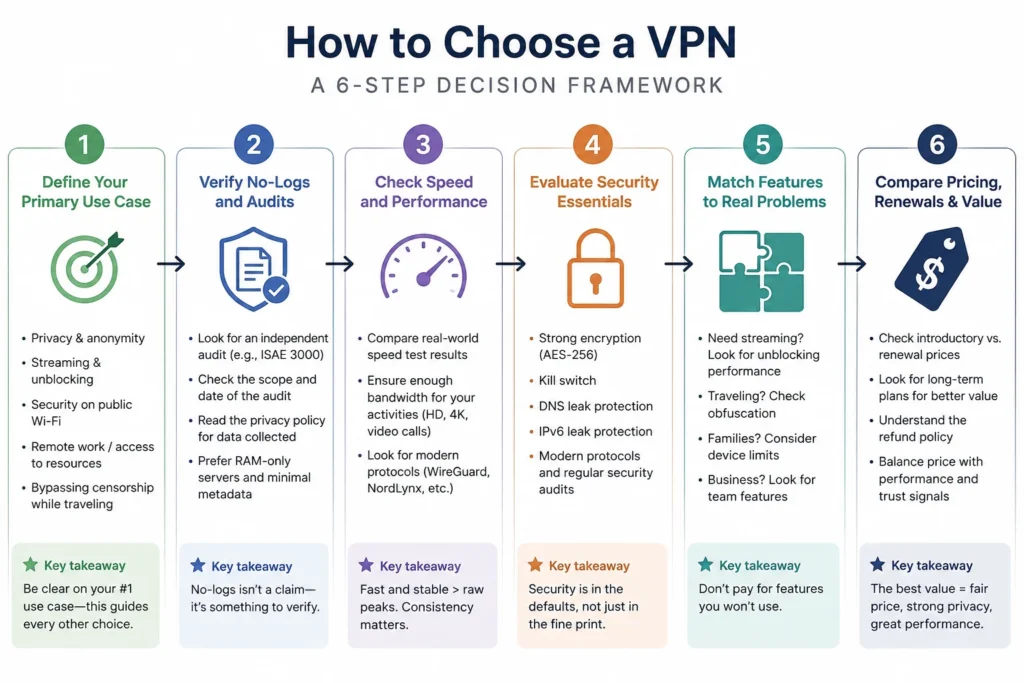
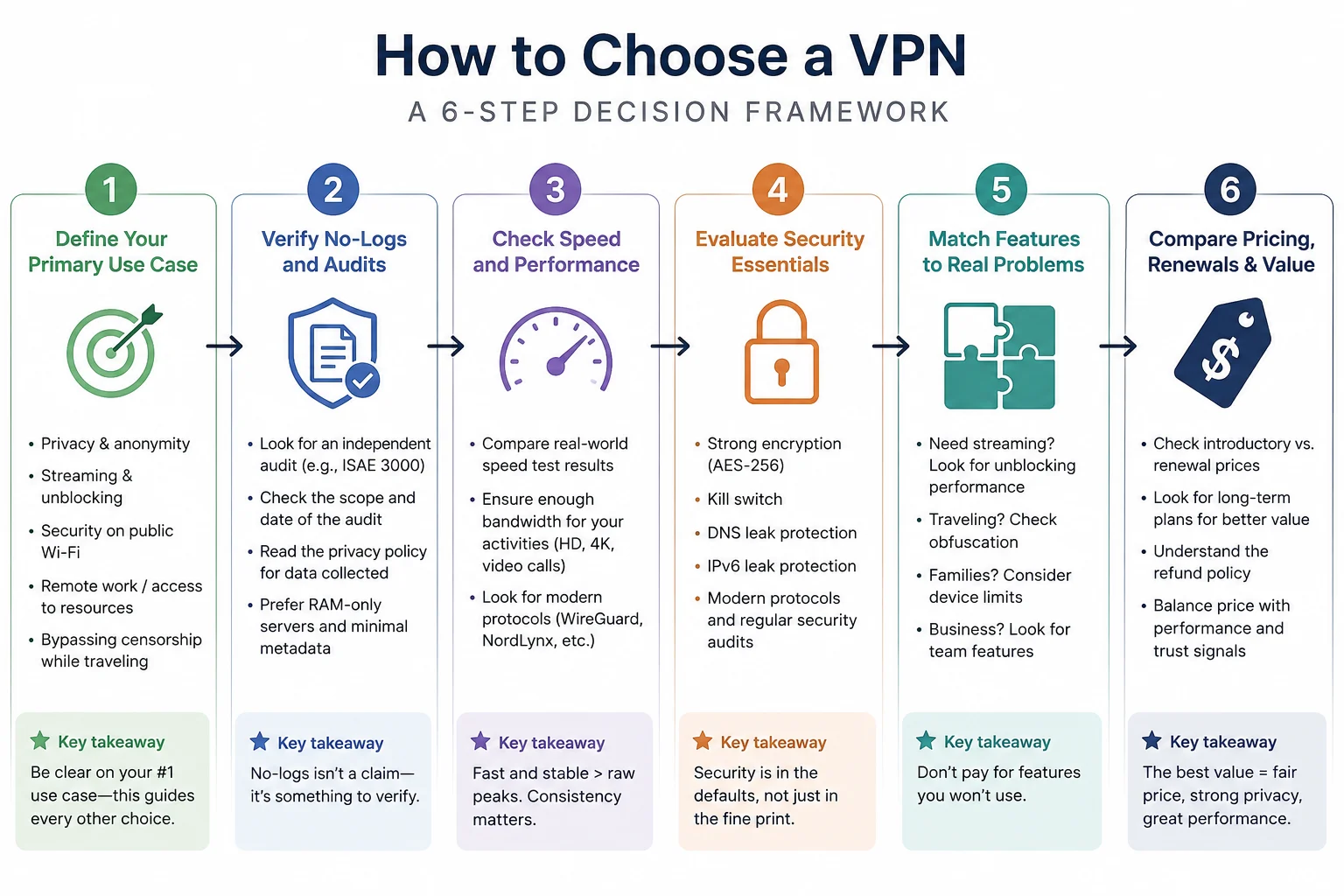
To choose a VPN well, start with the failure you want to prevent, set a privacy floor, confirm the service is fast enough for your real tasks, count every device, match only useful features, and compare renewal—not introductory—pricing. Then use the refund window to test the connection on your own networks and devices.
That order matters. A kill switch, split tunnelling and thousands of servers mean little until you know whether you are protecting public Wi-Fi traffic, reducing ISP visibility, reaching services while travelling, or connecting through a restrictive network. Once the problem is clear, most of the feature list stops mattering.
Reviewed: August 30, 2026 · Time to work through: about 15 minutes
Step 1
Name the problem before you compare anything
Four situations cover most legitimate reasons to run a VPN. Each points to a different set of requirements.
Networks you do not control
Cafés, hotels, airports, coworking spaces and shared Wi-Fi put weight on auto-connect rules, a reliable kill switch and DNS handled inside the tunnel.
Less visibility for your ISP
HTTPS hides page contents but not every destination signal. This use case puts weight on a genuinely audited no-logs policy and clear ownership.
Services while travelling
Check server placement in the country you need. Keep expectations honest: platforms actively block VPN traffic, so no provider can guarantee access.
Restrictive networks
Obfuscation becomes the first requirement. Everything else is secondary if the VPN cannot establish a connection.
If none applies—you work on a home network you control, trust the connection and do not need a different region—it is reasonable to decide that you do not need a VPN. Write down the one problem that does apply. Every later step should refer back to it.
Step 2
Set a privacy floor you will not negotiate
This is the one claim you cannot test personally. You are routing traffic through a company, so independent verification matters more than marketing language.
How to read a no-logs audit properly
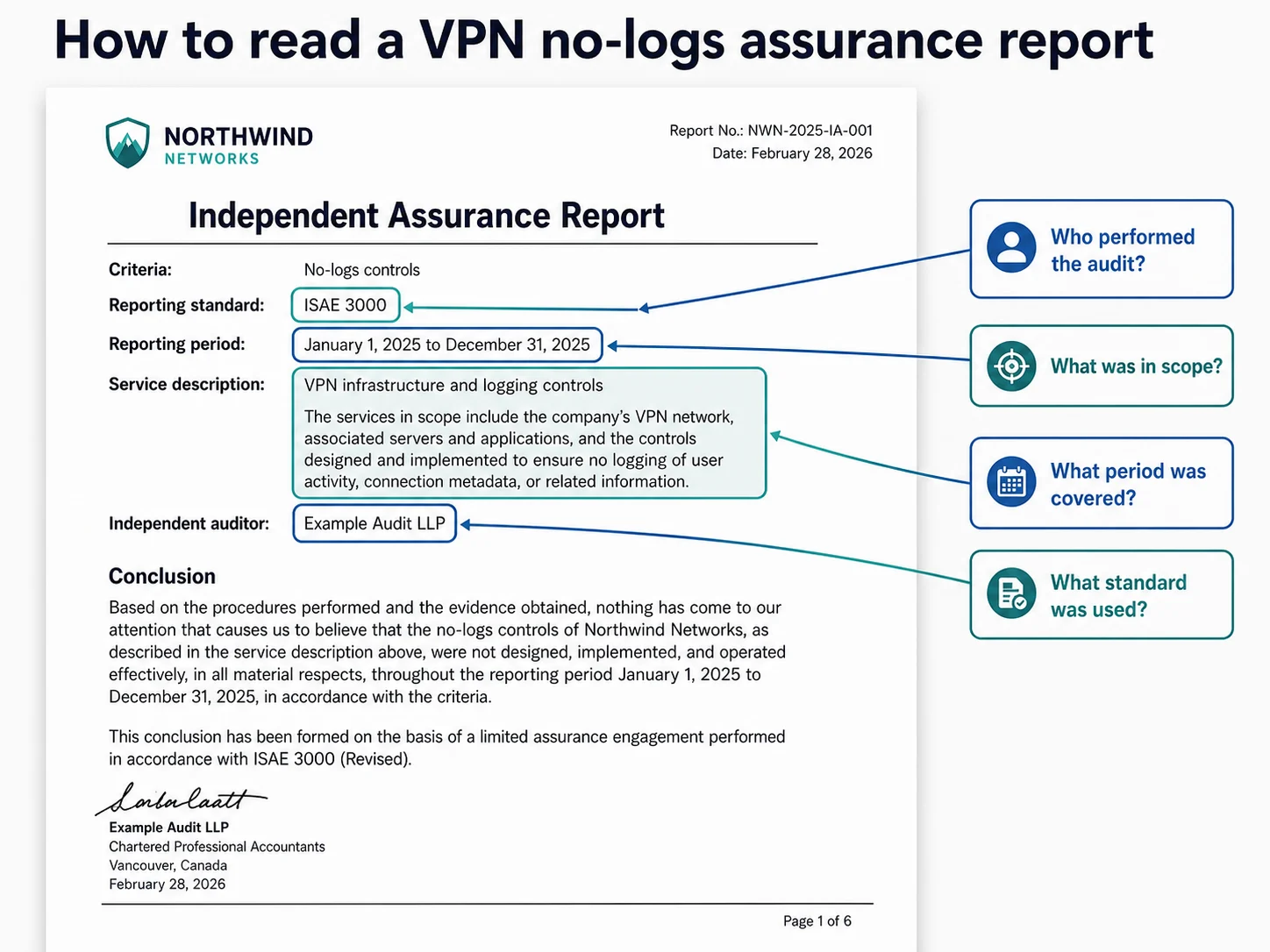
A penetration test checks apps for vulnerabilities. Useful—but it does not prove that a provider avoids keeping activity logs. A no-logs assurance engagement, often performed under ISAE 3000, examines relevant server configurations, deployment processes and internal controls. That is the evidence to look for.
- Who performed it? The audit firm should be named and recognisable.
- What period and scope were covered? A narrow app audit is not the same as examining the VPN service and logging controls.
- Is it recent and repeated? A pattern of current engagements is stronger than one old report.
- Can readers see the conclusion? Full reports provide more context than a promotional summary.
Jurisdiction: useful context, not a magic shield
Where a provider is legally based affects what it can be compelled to do. This matters most for high-risk threat models. For everyday use, a current independent audit, clear ownership and a transparent privacy policy are usually more useful than a flag used as a marketing shortcut.
Red flags that end the evaluation
- No independent no-logs assurance at all, or only an old security test presented as one
- A “lifetime” subscription for a service with permanent infrastructure costs
- A free product with no clear revenue model
- Ownership that cannot be identified
- A privacy policy that permits broad sharing with unnamed partners
Anything that fails this step is out, no matter how fast or cheap it appears.
Step 3
Work out how much VPN speed you actually need
Speed matters, but the gap between competent providers is often irrelevant to everyday use. Treat it as a threshold, not a trophy.
Protocol comes first. Modern WireGuard-based options are normally more efficient than legacy OpenVPN. Distance comes second. A nearby server should be much faster than one on another continent. Server load comes third. Useful regional placement matters more than a giant global total.
| Task | Practical bandwidth target | What matters besides throughput |
|---|---|---|
| Full HD streaming | 5 Mbps or higher | Stable routing and low buffering |
| 4K streaming | 15 Mbps or higher | Consistent speed, not a short peak |
| 720p group video calls | 2.6 Mbps down / 1.8 Mbps up | Latency, jitter and reconnect behaviour |
| Large transfers | As much as available | Nearby servers and sustained throughput |
Primary-source thresholds: Netflix connection recommendations and Zoom HD bandwidth requirements, checked August 30, 2026.
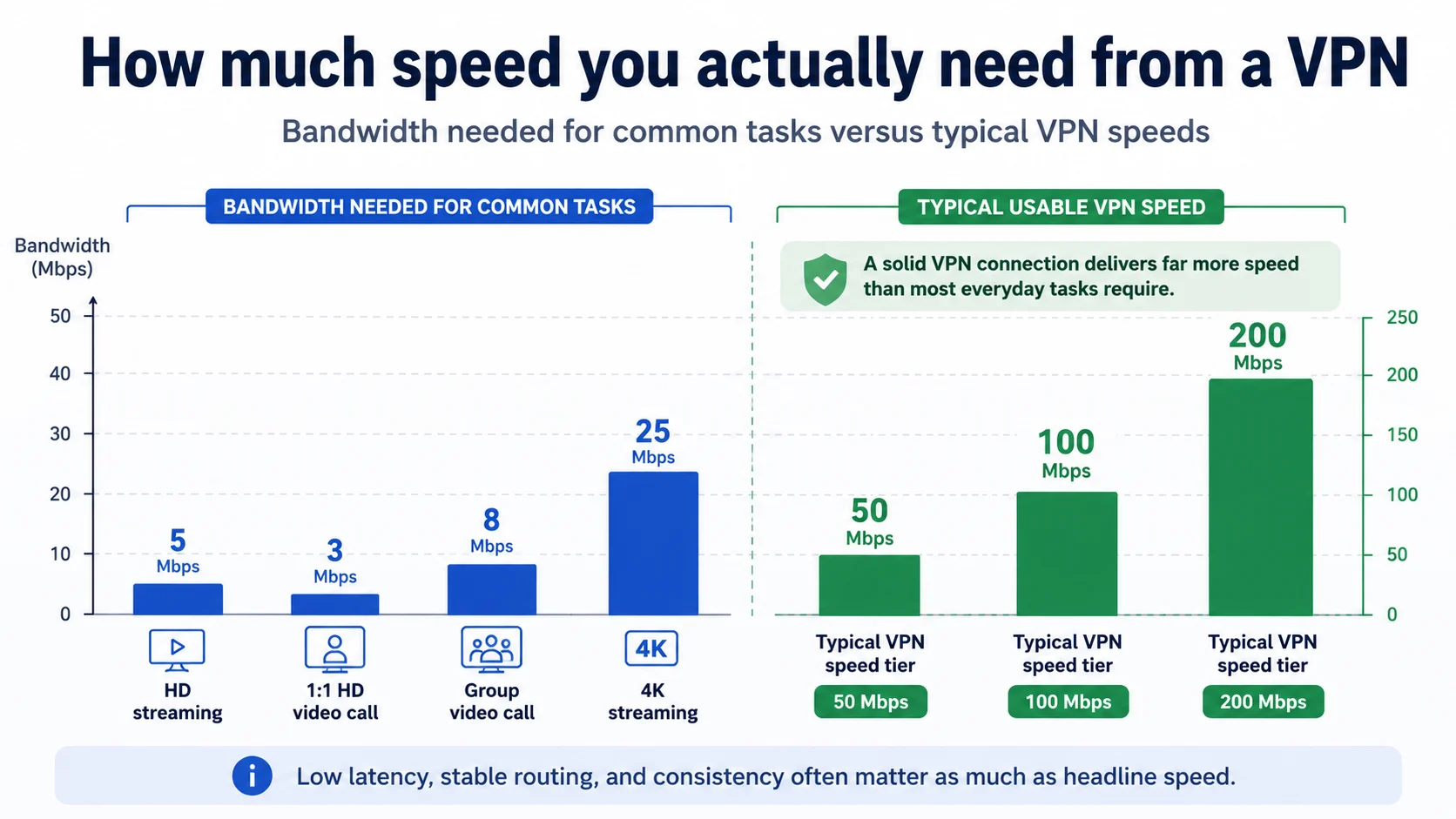
Commissioned “fastest VPN” studies can show that a service belongs in the competent tier, but their test conditions may not resemble your home, hotel or mobile network. Unless you routinely move large files or already have a marginal connection, use speed as pass/fail.
Step 4
Count every device—including the awkward ones
Phones and laptops are obvious. TVs, consoles, streaming sticks, tablets, work machines and a partner’s devices are where buying decisions go wrong.
First check the simultaneous connection limit. Five to ten connections may be enough for one person but too few for a household. Then confirm that each awkward device is supported. Many consoles and smart TVs cannot run a VPN app directly; they may require a compatible router, travel router or Smart DNS.
Finally, verify platform parity. A feature promoted on the main website may exist only on Windows or Android, or may work differently on iOS. If split tunnelling, auto-connect or a kill switch is the reason you are buying, confirm it exists on your operating system.
For a household count that includes routers, TVs and consoles, use our multiple-device VPN comparison.
Step 5
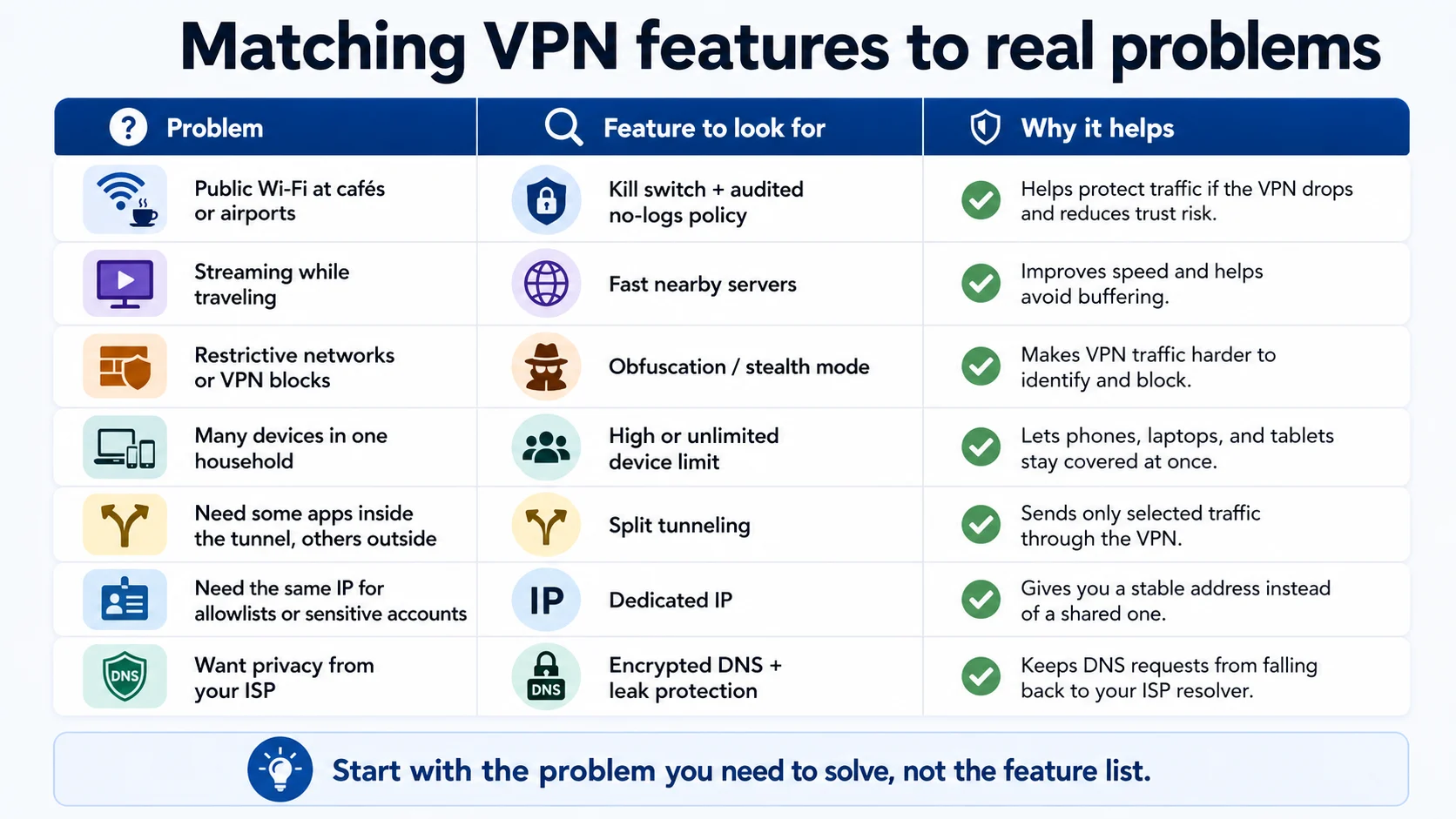
Match VPN features to real failure modes
Look at features only after the problem is clear. Ignore every row that does not describe your situation.
| Your problem | Feature to look for | Why it helps |
|---|---|---|
| Public Wi-Fi drops | Kill switch + fast reconnect | Stops traffic during the gap |
| VPN traffic is blocked | Obfuscation or stealth mode | Makes the tunnel harder to identify |
| Banking apps reject VPN IPs | Split tunnelling | Routes selected apps outside the tunnel |
| You forget to connect | Auto-connect on untrusted networks | Removes the manual failure point |
| IP-sensitive services | Dedicated IP | Provides a stable address |
| Known malicious domains | DNS-level filtering | Blocks recognised destinations before connection |
| High-risk threat model | Multi-hop routing | Separates entry and exit infrastructure |
Step 6
Compare introductory price, renewal and value
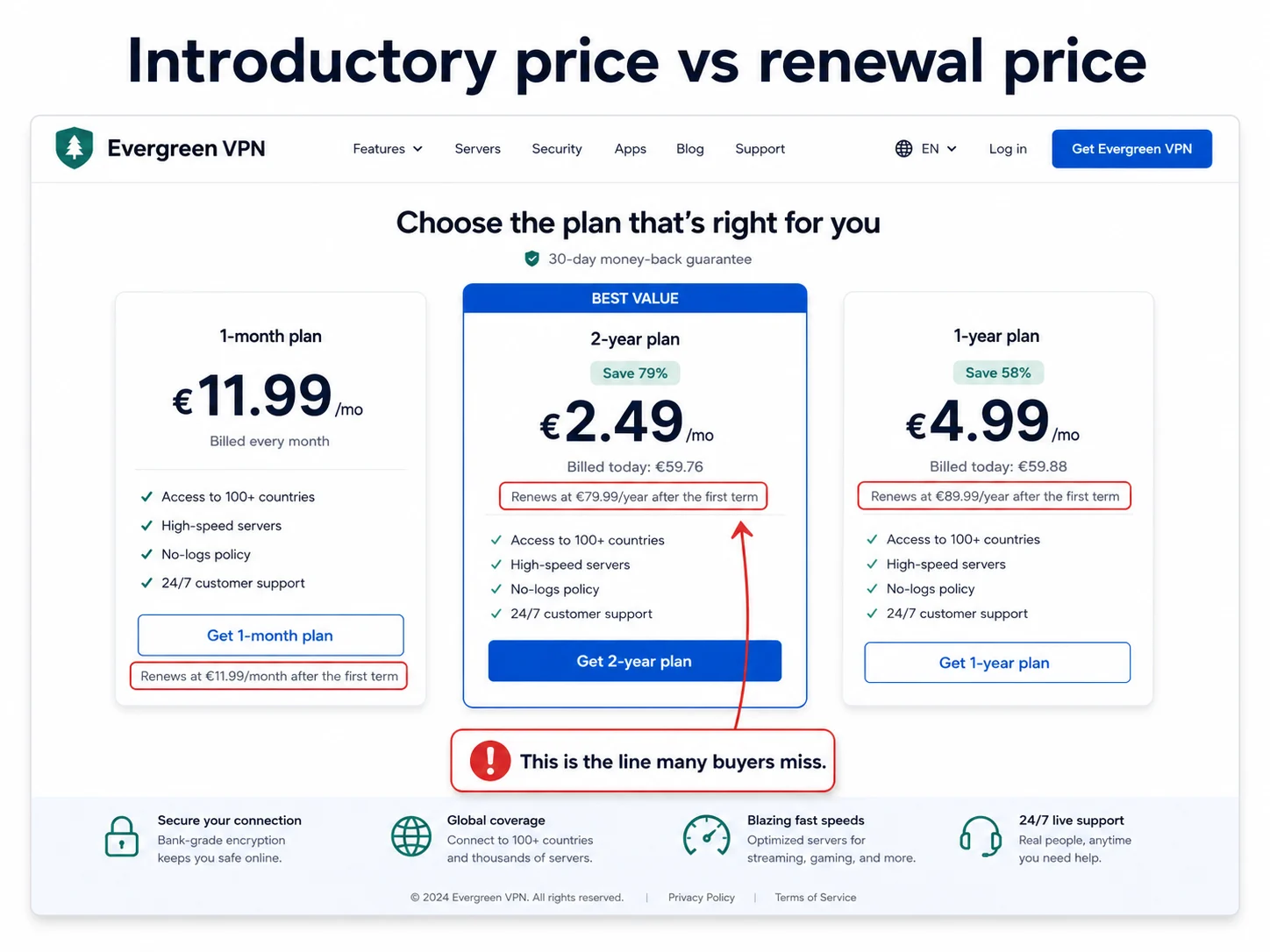
VPN pricing is easiest to understand when you separate the first term from the long-term cost.
- Read the renewal line. The promoted monthly figure is usually an introductory rate attached to a long first term.
- Treat the money-back guarantee as a test window. Put the deadline in your calendar and test during the first week.
- Pay only for features tied to your use case. An expensive security bundle has no value if you never enable it.
- Understand the free tier. A sustainable free plan needs a clear funding model and meaningful limits.
Final check
Test the VPN inside the refund window
A provider can meet every paper requirement and still perform badly on your network. Use the guarantee period before the decision becomes expensive.
- Compare speed on and off using the server distance you will actually use.
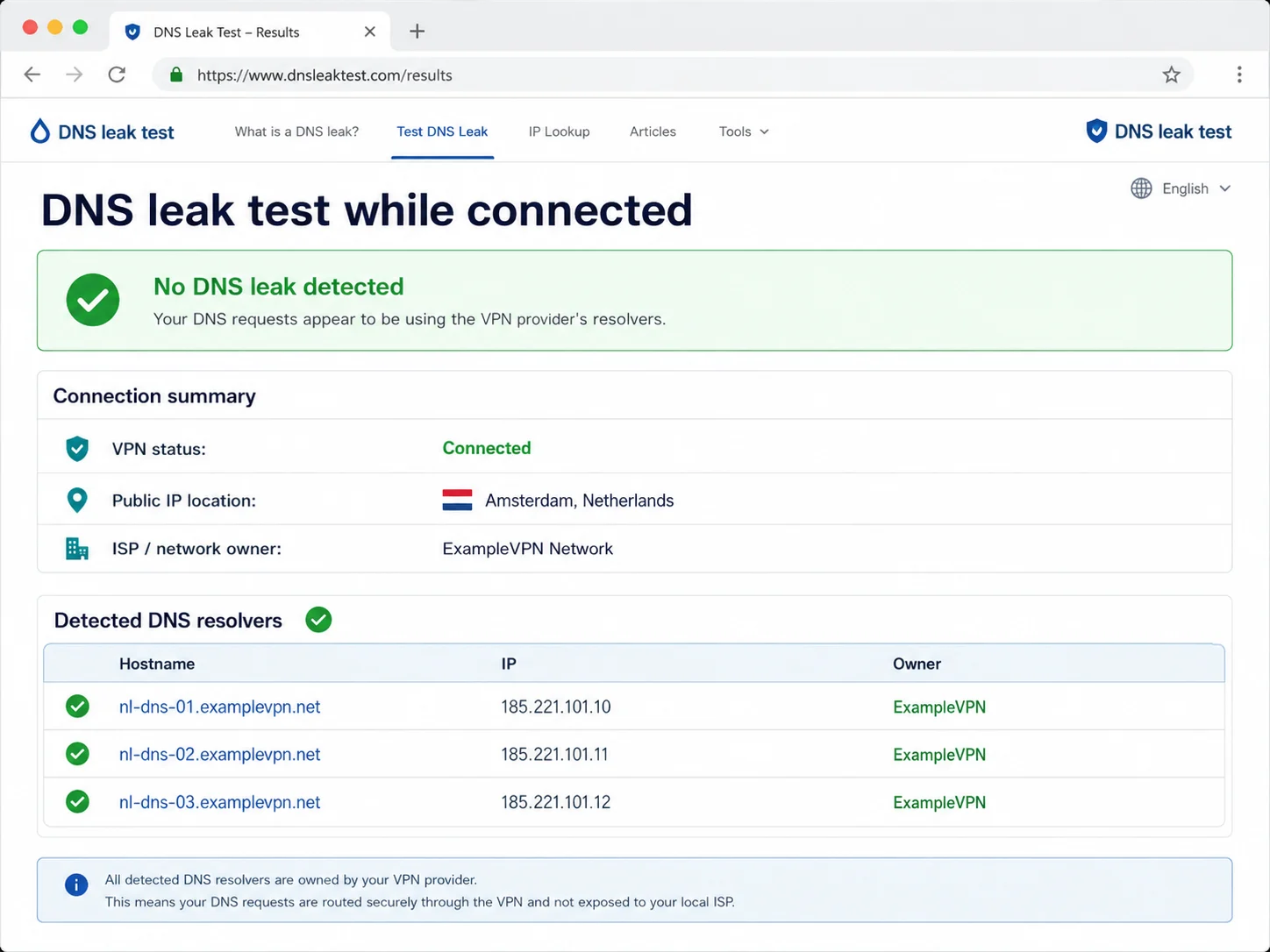
- Run a DNS leak test and confirm the resolver belongs to the VPN, not your ISP.
- Check the kill switch by interrupting the connection and confirming traffic stops.
- Try the exact use case that justified the subscription.
- Install it on every device you counted, especially TVs, consoles and routers.
- Test sleep and reconnect behaviour on laptops and mobile devices.
- Contact support once with a real question to see how the company responds.
If a failure matters to your use case, request the refund. That is what the window is for.
Worked examples
Three profiles, three different answers
The framework should not produce one winner for everyone. It should identify the best fit for a specific constraint.
Frequent traveller
NordVPN for restrictive networks
When the first requirement is connecting through restrictive hotel, campus or regional networks, the framework points to NordVPN. Obfuscation and broad device coverage address the failure mode directly; the repeated no-logs assurance history clears the privacy floor.
Why it fits
- Obfuscated connection options
- Repeated independent no-logs assurance
- Broad desktop, mobile and TV support
Trade-offs
- Ten-device limit
- Some extras require higher tiers
- Renewal exceeds the introductory rate
Large household
Surfshark for many devices
When device count is the deciding constraint, Surfshark’s unlimited simultaneous connections remove the cap. NoBorders also gives travellers a practical response to restricted networks without turning the app into a configuration project.
Why it fits
- Unlimited simultaneous devices
- NoBorders for restrictive networks
- Current independent no-logs assurance
Trade-offs
- Some features differ by platform
- Long-term price differs from the intro
- Feature breadth can add clutter
Privacy-first buyer
Proton VPN for verifiable privacy
When independent verification is the main reason to subscribe, Proton VPN is the natural fit. Open-source apps, repeated audits and a transparency record make more of the privacy claim inspectable. Its funded free tier also provides a low-risk way to evaluate the apps.
Why it fits
- Open-source clients
- Repeated independent no-logs audits
- Transparent free tier with no data cap
Trade-offs
- Free plan limits devices and locations
- Secure Core adds latency
- Feature parity varies by platform
Keep expectations honest
What a VPN cannot do
- It does not make you anonymous; it shifts some trust from the network or ISP to the VPN provider.
- It does not stop account-level tracking after you sign in.
- It does not secure a compromised device or remove a keylogger.
- It does not guarantee access to streaming platforms that actively block VPN traffic.
- It does not make an illegal activity legal, and VPN use may be restricted in some destinations.
FAQ
Choosing a VPN: common questions
How do I choose a VPN if I have never used one?
Start with why you want it: public Wi-Fi, ISP privacy, access while travelling or censorship. Then require a recent independent no-logs audit, confirm every device is supported and test the exact use case inside the refund window.
What is the most important thing to look for?
A recent independent no-logs assurance engagement. Speed and app features can be checked during a trial period; logging practices require credible external verification.
How many devices should a VPN cover?
Count everything you use now, then add TVs, consoles and routers you want covered. Most services allow several simultaneous connections; a household may benefit more from unlimited devices than from another specialist feature.
Are paid VPNs worth it compared with free ones?
Usually. Many free services rely on ads, data collection or severe limits. A transparent, provider-funded free tier can be useful, but check its device and location restrictions.
Does a VPN slow down the internet?
Yes, because encryption and routing add overhead. With a modern protocol and a nearby server, the change is often modest. Distance, server load, latency and the quality of your original connection matter greatly.
Methodology
How we built this framework
We separated claims readers can verify on their own network—speed, app support, reconnect behaviour and device coverage—from privacy claims that require independent evidence. Provider Hub records and the current official documentation in our source pack were checked on August 30, 2026. No provider can buy a place in the framework; each worked example follows from a different constraint.
The threat model follows the FTC’s current public Wi-Fi guidance. Task thresholds use the Netflix and Zoom documentation cited with the speed table.
Continue with the complete VPN Guides hub, browse VPN Basics guides, apply the framework to the best VPNs for travel, or see guide to safer public Wi-Fi.