

The short answer
Best VPN for Linux: choose by support boundary, not brand recognition
NordVPN is the best Linux VPN for most users because its native GUI and CLI cover current Debian, Ubuntu, Mint, Fedora and Raspberry Pi OS releases with several protocol choices. Proton VPN is the privacy-first alternative and offers application-level split tunneling in supported native GUI builds. Surfshark is the practical pick for older supported distro releases, XFCE desktops and ARM64 systems.
A Linux logo on a pricing page is not enough. The real questions are whether your exact distribution, release, desktop environment and CPU architecture are supported—and whether the package exposes the features you expect. A provider repository, Snap and Flatpak build can behave differently even when all three install successfully.
This comparison is based on provider documentation checked September 26, 2026. It also includes attributed results from Artifact Security’s June 2026 global VPN performance test so the performance section is not an empty placeholder. That lab used Windows rather than Linux, so we treat its numbers as a network-performance reference—not proof that the Linux apps will reproduce the same result. The Linux-specific ranking still depends on compatibility, routing and recovery, followed by a repeatable test on your own machine.
Decision map
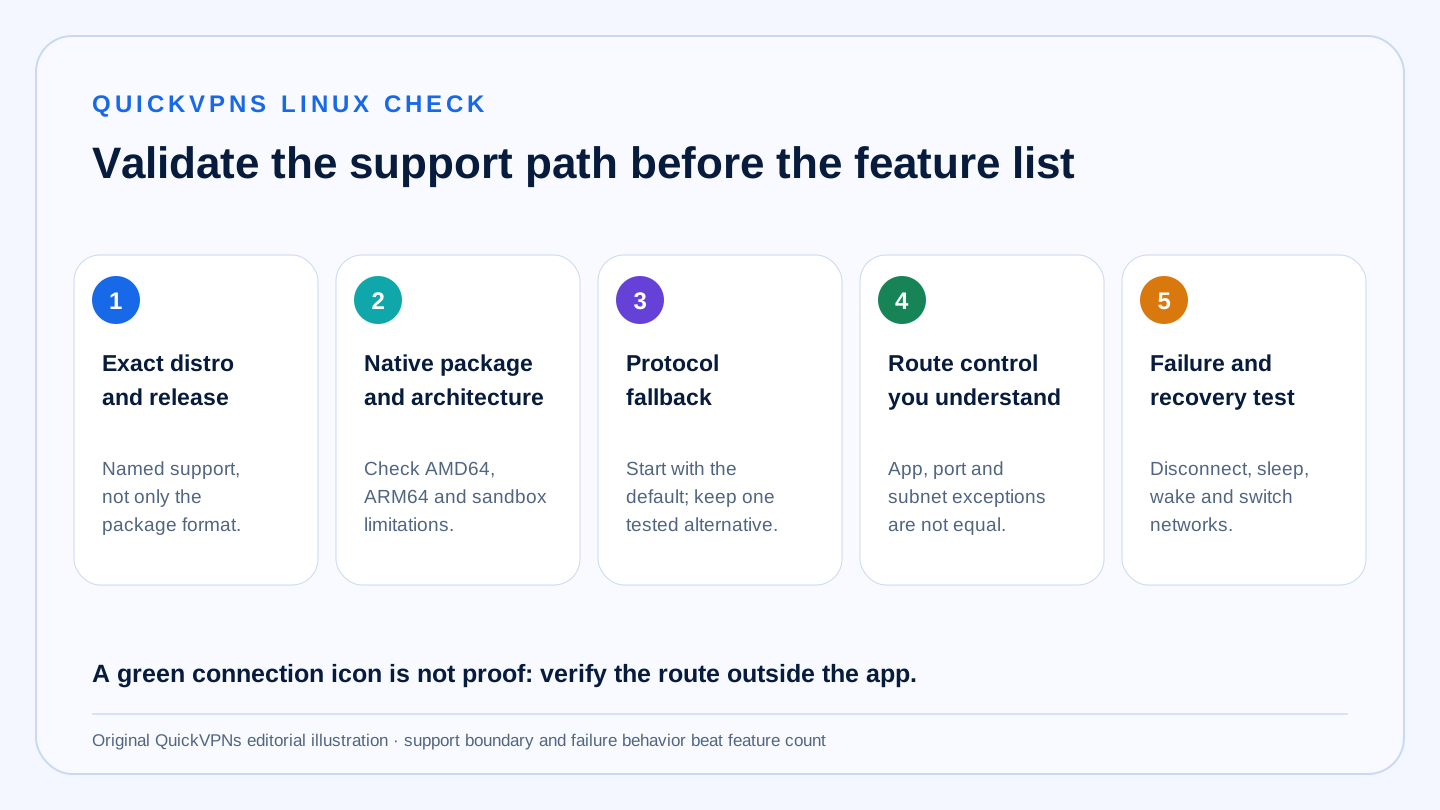
Five Linux checks before you pay
Distro · package · protocol · route control · recovery
What matters
How to choose a Linux VPN
Linux support is a matrix, not a yes-or-no badge.
- Distribution and release
Check the provider’s currently supported Debian, Ubuntu, Mint, Fedora, Arch or derivative versions—not just the package format.
- CPU architecture
AMD64 support does not guarantee ARM64 support. This matters on Raspberry Pi, ARM laptops and some home servers.
- GUI and CLI parity
A graphical app can simplify daily use while a CLI makes headless access and reproducible checks easier. Confirm which features exist in each.
- Routing control
Application exclusions, port allowlists and subnet exceptions are different tools. Match the implementation to the traffic you need to bypass.
- Failure behavior
Test tunnel loss, sleep and wake, network switching, DNS, IPv6 and local-network access. A connected icon is not proof of the route.
At a glance
Linux compatibility comparison
These are documented support boundaries, not promises that every derivative will work.
| Criterion | NordVPN | Proton VPN | Surfshark |
|---|---|---|---|
| Documented distro path | Debian 12+, Ubuntu 22.04+, Mint 21+, Fedora 43+, Raspberry Pi OS | Latest Debian, Ubuntu and Fedora; Arch package also documented | Debian 11+, Ubuntu 20.04+, Mint 20+ |
| Desktop coverage | GNOME and KDE | GNOME officially; other environments may work with limited support | GNOME, KDE and XFCE |
| Architecture note | Verify package for the exact distribution | Snap does not support ARM; native path varies by distribution | AMD64 and ARM64 documented |
| GUI and CLI | GUI uses the installed CLI core | Native GUI and CLI documented | Graphical app plus manual configuration options |
| Protocols in current docs | NordLynx, NordWhisper, OpenVPN TCP/UDP | WireGuard and OpenVPN; additional options vary by app path | WireGuard and OpenVPN |
| Linux route exceptions | Ports and subnets through Allowlist | Application include/exclude modes in supported native GUI builds | No Linux Bypasser claim in current feature matrix |
| Best fit | Broad all-round desktop use | Privacy-first controls and app-level split tunneling | Older supported releases, XFCE or ARM64 |
A distribution based on Ubuntu or Debian may work, but the provider can limit troubleshooting to named releases and desktop environments. Confirm support before committing to a long subscription.
Published lab results
Independent VPN performance results
A real comparison from one controlled test—not three unrelated marketing claims.
Artifact Security’s June 2026 VPN Performance World Tour tested commercially acquired products across 55 route-pinned connections from Frankfurt, London, Singapore, New York and San Francisco. The lab used real hardware and networks, Ookla tests pinned to exact destination servers, removed each vendor’s fastest and slowest run per route, and published its methodology and report. AMTSO lists the evaluation as compliant with its Standard v1.3.
| Artifact Security result | NordVPN | Proton VPN | Surfshark |
|---|---|---|---|
| Overall score and award | 91 · Platinum | 83 · Gold | 81 · Gold |
| Average download across tested routes | 271.9 Mbps | 165.2 Mbps | 208.7 Mbps |
| Best single-route download median | 568.4 Mbps | 249.7 Mbps | 508.9 Mbps |
| Average latency across routes | 238.8 ms | 231.4 ms | 236.9 ms |
| Average jitter | 16.30 ms | 5.93 ms | 15.51 ms |
| Time to a working tunnel | 1.8 s | 2.9 s | 2.9 s |
These are Artifact Security’s Windows results, not QuickVPNs Linux measurements. They show comparative network behavior under one documented global test, but Linux kernel, client, protocol, route and server load can change your result. Use the 15-minute Linux acceptance test below before keeping a subscription.
Sources: Artifact Security evaluation report and AMTSO test listing, checked September 26, 2026.
The shortlist
Best Linux VPN apps
Three credible choices, ranked by Linux-specific fit rather than generic feature count.
Best Linux VPN overall
NordVPN
NordVPN is our default Linux pick for users on a supported mainstream distribution who want a graphical interface without giving up command-line control. Its current Linux GUI is built on the same core as the CLI, so the two interfaces can be used around the same installed service rather than as unrelated products.
The documented GUI protocol menu includes NordLynx, NordWhisper, OpenVPN TCP and OpenVPN UDP. That range is useful when the fastest everyday default fails on a restricted or unstable network. Linux routing exceptions need careful reading: NordVPN offers an Allowlist for ports, port ranges and subnets, not the app picker found on Windows and Android. Traffic matching an Allowlist rule bypasses both the tunnel and Kill Switch blocking.
Strengths
- Native GUI backed by the CLI core
- DEB, RPM and Snap package paths
- Multiple documented protocol choices
- Current support for major Debian-, Ubuntu- and Fedora-based releases
Trade-offs
- Only GNOME and KDE are in the documented desktop support boundary
- Linux Allowlist is not application-based split tunneling
- Community-supported distributions receive limited distro-specific help
Best privacy-first Linux option
Proton VPN
Proton VPN is the strongest alternative when transparent platform documentation and application-level routing controls matter more than the widest desktop-environment promise. It documents native GUI and CLI routes and actively supports current Debian, Ubuntu and Fedora releases. An Arch package is also documented, while unsupported derivatives may work without the same support commitment.
The native installation path matters. Proton warns that the Snap package omits advanced features including Proton Protocols, Stealth and split tunneling, and does not support ARM devices. In supported native GUI builds, split tunneling can exclude selected applications or protect only selected applications. Current documentation also notes limitations: availability depends on the supported build, changes require reconnection or app restart, and a saved configuration may occasionally reset after app startup.
Strengths
- Detailed native GUI and CLI documentation
- Application-level include and exclude modes where supported
- WireGuard and OpenVPN paths documented for Linux
- Clear package-specific limitation notes
Trade-offs
- Official desktop support is narrower than “works on Linux” implies
- Snap package loses important advanced features
- Linux split tunneling has documented limitations and requires careful testing
Best for XFCE and ARM64
Surfshark
Surfshark is the practical fit when your hardware or desktop falls outside the narrower mainstream matrix. Its Linux setup documentation names Debian 11+, Ubuntu 20.04+ and Mint 20+, plus GNOME, KDE and XFCE. It also explicitly lists AMD64 and ARM64 architectures and both systemd and SysVinit service managers.
The Linux app supports WireGuard and OpenVPN according to current protocol documentation. The important caveat is route control: Surfshark’s current feature matrix lists Bypasser on several desktop and mobile platforms but not Linux. Do not buy it assuming the Windows Bypasser interface will appear unchanged on your Linux machine. Treat the documented Linux Kill Switch and auto-connect behavior as separate features and verify them after installation.
Strengths
- Explicit AMD64 and ARM64 support
- GNOME, KDE and XFCE documented
- Older supported Debian, Ubuntu and Mint baselines
- WireGuard and OpenVPN availability
Trade-offs
- No Linux Bypasser claim in the current feature matrix
- Fedora is not listed in the current native-app support boundary
- Package-store convenience does not remove distro compatibility checks
Install safely
Repository, Snap, Flatpak or manual configuration?
The shortest install command is not automatically the best supported path.
- Start with the provider’s native repository. This is usually where the provider documents the full supported feature set, signing key, package updates and uninstall path. Match the instructions to your exact distribution release.
- Use Snap or Flatpak only after reading limitations. Sandboxing can restrict networking features. Proton explicitly documents missing functionality in its Snap package; another provider’s package may have different trade-offs.
- Use manual WireGuard or OpenVPN for a defined reason. Manual profiles can help on a headless host, router or unsupported interface, but they may omit account-level conveniences such as automatic server selection, threat filtering or provider-specific fail-safe controls.
- Do not pipe an unknown script into a privileged shell. Follow the provider’s official installation instructions, inspect the domain and commands, and keep the package manager’s update path intact.
Read how VPNs work, then compare device-specific choices in our review all VPN guides and device setup guides. For a gateway install, use the separate router VPN guide.
Protocol choice
WireGuard or OpenVPN on Linux?
WireGuard is a sensible first choice for most everyday Linux connections. Its official protocol documentation describes a compact UDP-based tunnel with a deliberately small set of cryptographic primitives. The provider may wrap it in its own name or account system, so the interface can differ even when WireGuard is underneath.
OpenVPN remains useful when you need TCP transport, a manual configuration file or compatibility with an existing network setup. The official OpenVPN 2.6 manual supports both UDP and TCP and notes that OpenVPN is designed to operate optimally over UDP, while TCP is available for cases where UDP cannot be used.
Protocol labels do not decide real performance by themselves. CPU, kernel, server distance, congestion, MTU and provider implementation all matter. Test the provider’s default first, then compare one alternative on the same server location and connection instead of copying a benchmark from unrelated hardware.
Repeatable test
A 15-minute Linux VPN acceptance test
Record the result. “It connected” is only step one.
- Capture a baseline. Before connecting, record your public IPv4 and IPv6 addresses, DNS resolver, local printer or NAS access and one stable latency/download check.
- Connect to a nearby server. Repeat the same checks. The public route and DNS result should match the VPN state you selected; note any IPv6 behavior rather than assuming it is disabled or tunneled.
- Trigger a controlled failure. Disconnect the network interface briefly or switch between Wi-Fi and Ethernet. Confirm whether traffic stops, reconnects or escapes outside the tunnel according to the Kill Switch setting.
- Test sleep, wake and reboot. Verify auto-connect and Kill Switch state after each transition. Check outside the app, because a status icon can lag behind the actual route.
- Test the exception model. If you use split tunneling or an allowlist, verify both the protected and bypassed path. Remember that an excluded app, port or subnet intentionally leaves VPN protection.
- Keep or cancel on evidence. Save the package version and results. If a documented feature fails on a supported system, contact support during the refund window and avoid building permanent rules around a workaround you cannot reproduce.
If the tunnel fails one of these checks, work through our VPN troubleshooting guide before reinstalling or changing several network settings at once.
Know the boundary
What a Linux VPN will not fix
A consumer VPN protects the route between your machine and a provider-controlled server. It does not repair an unpatched kernel, remove malware, secure a compromised browser extension or replace full-disk encryption and strong account authentication.
Split tunneling deliberately creates two trust paths. Traffic outside the tunnel is visible to the normal network path and is not protected by the VPN’s exit server or Kill Switch in the same way. Keep exceptions narrow, documented and periodically reviewed.
For company systems, use the employer’s managed VPN or zero-trust access method. A personal VPN subscription is not a replacement for corporate identity controls, device compliance or access logging.
Practical answers
Best VPN for Linux FAQ
What is the best VPN for Linux?
NordVPN is the best all-round Linux VPN in this comparison for users on a currently supported Debian, Ubuntu, Mint, Fedora or Raspberry Pi OS release. Proton VPN is stronger when application-level split tunneling or transparent Linux documentation matters most, while Surfshark supports a useful mix of older distro releases, XFCE and ARM64.
Do Linux VPN apps have a graphical interface?
Yes. NordVPN, Proton VPN and Surfshark all document graphical Linux applications, but supported distributions, desktop environments and feature parity differ. Check the provider’s current support boundary before paying.
Does split tunneling work on Linux?
It depends on the provider and installation method. Proton VPN documents application-level include and exclude modes in supported native GUI builds. NordVPN uses an allowlist for ports and subnets on Linux rather than the application picker offered on some other platforms.
Should I install a Linux VPN from Snap or the provider repository?
Prefer the provider’s documented native repository when you need the full supported feature set. Sandboxed packages can be convenient, but providers may document missing protocols, split tunneling or architecture support.
Is WireGuard or OpenVPN better on Linux?
WireGuard is a sensible default for most everyday connections because it has a compact design and uses UDP. OpenVPN remains useful when you need TCP transport, a specific manual configuration or a network where the default protocol fails.
How we selected
Methodology and evidence
QuickVPNs compared provider documentation for supported distributions, release floors, desktop environments, CPU architectures, package paths, protocols, routing exceptions and failure controls. Sources were checked September 26, 2026. We weighted official support boundaries and operational clarity above generic feature count.
The performance table reproduces attributed results from Artifact Security’s June 2026 controlled test and links the full report plus its AMTSO listing. Because the lab tested Windows, those numbers inform the network-performance context but do not determine our Linux-app ranking or claim Linux parity. Provider documentation remains the source for current Linux compatibility; use the acceptance test above because kernels, network managers, package versions and routes change.
These are editorial recommendations, not provider-bought placements. The next scheduled review is January 31, 2027, or earlier if a provider materially changes its Linux application.