

The short answer
Best dedicated IP VPN: buy one only when a stable address solves a named problem
NordVPN is the best dedicated IP VPN for most individuals because it offers a broad location choice and works across mainstream apps. Surfshark is the simpler value alternative. Proton VPN is not our personal dedicated-IP pick: its dedicated IP product is designed for organizations and sits inside business plans.
A dedicated IP is a VPN exit address reserved for one customer instead of shared by many subscribers. It can make allowlists, remote access, banking consistency and reputation-sensitive services easier. It does not make the VPN faster by definition, and it is usually less anonymous than a shared address because your activity returns to the same stable identifier.
If you cannot name the system that requires a stable IP, do not buy the add-on. Shared VPN servers are the better privacy default for ordinary browsing because many users blend behind the same public address.
Decision map
Do you actually need a dedicated IP?
Allowlist · remote access · reputation · privacy trade-off · recurring cost
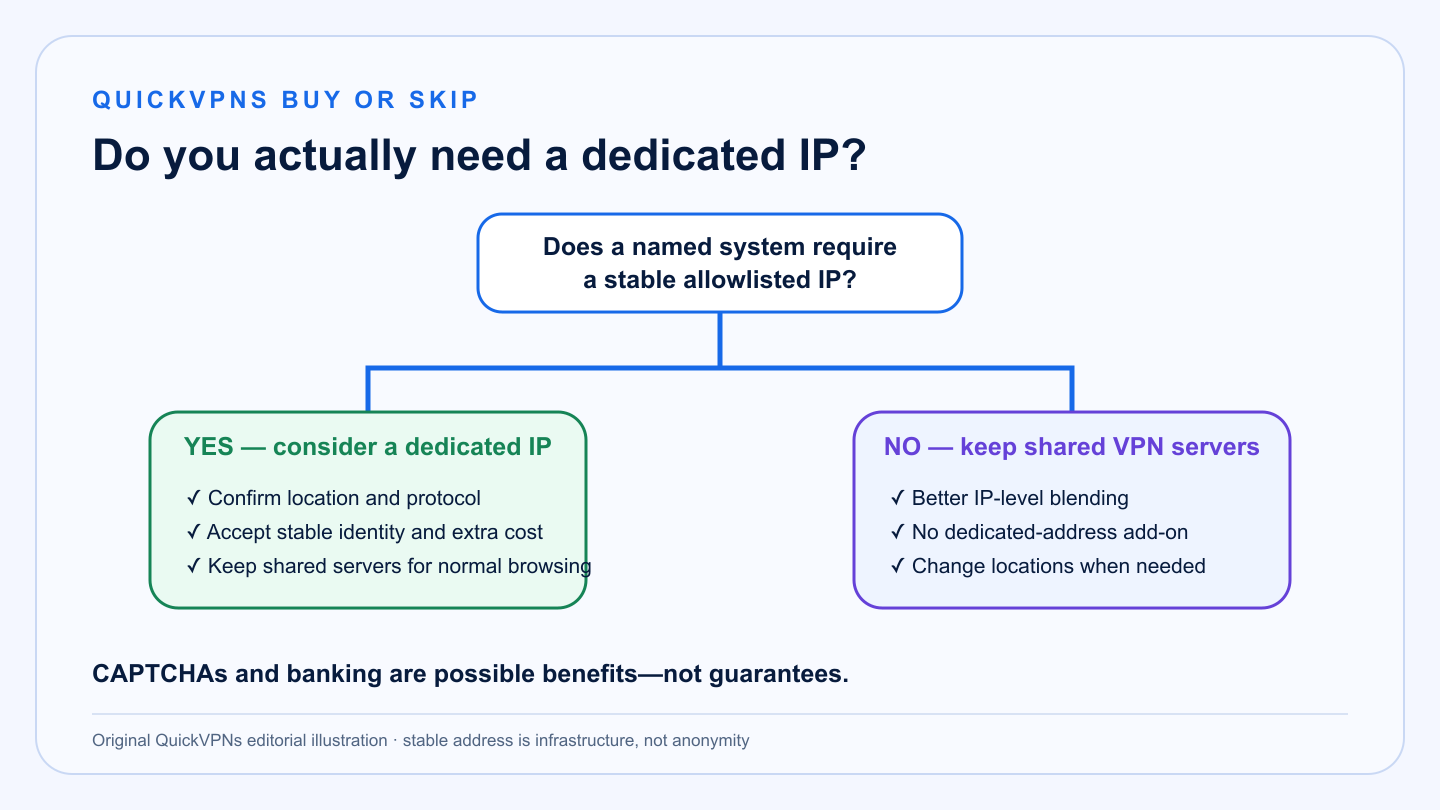
Fit first
Dedicated IP vs shared VPN IP
The right choice depends on whether consistency or anonymity matters more.
| Need | Dedicated IP | Shared VPN IP |
|---|---|---|
| Company allowlist | Strong fit: one stable address can be approved | Poor fit: exit address can change |
| Home server or remote access | Useful when inbound architecture and provider terms support it | Usually inconvenient |
| CAPTCHA reduction | May help after reputation stabilizes; no guarantee | Shared activity can trigger more challenges |
| Banking consistency | Can reduce location and IP changes; bank may still block VPNs | More variable |
| Privacy blending | Weaker: stable address is easier to correlate | Stronger: many users share one address |
| Extra recurring cost | Yes | Usually included in the VPN plan |
At a glance
Best dedicated IP VPN comparison
Location inventory and add-on pricing change. Check the live plan before checkout.
| Criterion | NordVPN | Surfshark | Proton VPN |
|---|---|---|---|
| Product fit | Individuals and small teams | Individuals wanting a simple add-on | Organizations on business plans |
| Best for | Location flexibility and mainstream apps | Simple ownership and value | Managed business access |
| Identity trade-off | Address is linked to the purchasing account | Address is assigned to the account | Managed organizational assignment |
| Can switch to shared servers | Yes | Yes | Yes |
| Important limit | Protocol and simultaneous-use rules differ | One dedicated IP per subscription | Not a consumer add-on |
The shortlist
Best dedicated IP VPN options
The ranking separates personal add-ons from business infrastructure.
Best dedicated IP for most people
NordVPN Dedicated IP
NordVPN is the strongest all-round choice for an individual or small operator who needs a stable VPN exit in a specific region. Its dedicated IP option works through mainstream NordVPN apps and has a broad published location list.
There are meaningful operational rules. NordVPN says a dedicated IP can be used on up to ten devices with OpenVPN, while NordLynx allows one simultaneous connection to that dedicated address. IKEv2 is not supported for dedicated IP. Provisioning can take time, so do not schedule an allowlist migration for the same hour you buy.
Strengths
- Broad dedicated-IP location choice
- Available in mainstream apps
- Useful for allowlists and consistent access
- Shared servers remain available
Trade-offs
- Extra recurring add-on cost
- Address is linked to the purchasing account
- NordLynx simultaneous-use rule is restrictive
- Provisioning may take up to several business days
Best simple-value dedicated IP
Surfshark Dedicated IP
Surfshark packages dedicated IP as a straightforward add-on inside its apps. It is a good fit when the requirement is simple: one account, one reserved address and fewer unexpected location changes.
Surfshark says the add-on can help with remote work, online payments and CAPTCHA friction, but none of those outcomes is guaranteed. A bank can still block a VPN range, and a new dedicated address can still inherit or develop reputation problems. Surfshark also limits one dedicated IP to one subscription, so organizations that need several locations should look at a business architecture rather than stacking personal accounts.
Strengths
- Simple in-app dedicated-IP workflow
- Unlimited device plan remains useful
- Shared servers stay available
- Good fit for one stable personal location
Trade-offs
- One dedicated IP per subscription
- Extra recurring cost
- No guaranteed CAPTCHA or banking result
- Stable identity reduces shared-IP blending
Business option, not a personal pick
Proton VPN Business Dedicated IP
Proton VPN’s dedicated IP offering belongs to its business stack. It is designed for organizations that need static gateways, controlled access and predictable egress rather than an individual who wants fewer CAPTCHAs.
That distinction is useful. A business plan can align the IP with managed users and company policy, but it carries per-user and server costs that make no sense for most personal buyers. Proton also explicitly notes that a dedicated IP is less private than shared servers because the address belongs to one customer.
Strengths
- Designed for managed organizational access
- Static gateway for allowlists
- Clear privacy trade-off documentation
- Users can still use shared servers
Trade-offs
- Business product, not a consumer add-on
- Per-user and dedicated-server costs
- Requires administrative planning
- Not the right choice for casual CAPTCHA reduction
Before checkout
Dedicated IP buying checklist
Write the answers down before adding another recurring fee.
- Name the destination. Which bank, admin panel, firewall or remote-access service needs the stable IP?
- Confirm allowlisting. Ask the system owner whether a consumer VPN address is permitted and whether IPv4, IPv6 or a particular region is required.
- Choose the location once. A dedicated address is tied to a location. Changing it may require another purchase or support process.
- Check protocol and device rules. Do not assume the add-on inherits the plan’s full simultaneous-connection allowance on every protocol.
- Document recovery. Keep a shared-server path and a direct emergency route. If the dedicated endpoint fails, critical work should not stop.
- Test reputation. During the refund window, check the actual services you care about. “Fewer CAPTCHAs” is a possibility, not a service-level agreement.
The real trade-off
A dedicated IP is not more anonymous
Shared VPN servers place many customers behind one address. That does not create anonymity on its own—accounts, cookies and browser fingerprints still identify people—but it reduces simple IP-level distinction between subscribers.
A dedicated IP does the opposite: it makes one subscriber’s exit stable. That is useful for access control and reputation, but easier to correlate over time. Providers generally associate the address with the purchasing account so they can provision it.
Use the dedicated endpoint only for the tasks that need it. Switch back to shared servers for ordinary browsing when IP-level blending matters more than consistency. Read how VPNs change visibility and browse our VPN Guides hub for the wider trust model.
Architecture check
Dedicated exit IP is not the same as inbound remote access
A dedicated VPN exit gives websites and company firewalls a stable address to see. It does not automatically open a port back to your laptop, publish a home server, or replace a zero-trust access gateway. Carrier-grade NAT, provider firewall rules and the absence of port forwarding can still prevent inbound connections.
For a company allowlist, the normal pattern is outbound: the employee connects to the VPN, the VPN exits through the reserved address, and the company application accepts that address. For hosting or inbound administration, document the full path and confirm port-forwarding terms before purchase. Never expose Remote Desktop or an admin panel directly to the public internet simply because the IP is stable.
Practical answers
Best dedicated IP VPN FAQ
What is the best dedicated IP VPN?
NordVPN is the best all-round personal option because of its location flexibility and mainstream app support. Surfshark is the simpler value alternative. Proton’s dedicated IP is aimed at organizations.
Do I need a dedicated IP VPN?
Only if a stable VPN address solves a specific task such as an allowlist, remote-access policy or reputation-sensitive login. Most personal users are better served by shared VPN servers.
Will a dedicated IP stop CAPTCHAs?
It may reduce challenges after the address builds a stable reputation, but no provider can guarantee that third-party sites will stop showing CAPTCHAs.
Is a dedicated IP safer for banking?
It can reduce repeated IP and location changes, but a bank may still reject VPN traffic. Multi-factor authentication and account security remain more important.
Is a dedicated IP more private?
No. It is stable and usually associated with one customer, so it offers less IP-level blending than a shared VPN address.
How we selected
Methodology and evidence
QuickVPNs compared current official documentation for intended use, account association, location choice, protocol and device rules, provisioning, organizational fit and the ability to switch back to shared servers.
We excluded guaranteed claims about CAPTCHAs, banking and speed because those outcomes depend on third parties and address reputation. Pricing and location availability are volatile; confirm them on the live plan page before purchase.
The comparison treats a dedicated address as infrastructure, not an automatic privacy upgrade. We checked who controls the address, how it is provisioned, which protocols and concurrent connections apply, and whether shared servers remain available. Buyers should confirm the destination’s allowlist policy before paying and test reputation-sensitive services during the refund window. A stable IP is useful only when it solves a named access problem. Explore the VPN Guides hub, browse privacy and security guides, or compare personal and business VPN architecture.
Access model
Confirm the direction of access
We also separated outbound allowlisting from inbound remote access. A reserved exit address can satisfy a firewall rule, but it does not automatically provide port forwarding, a private gateway or safe administration. That distinction prevents buyers from paying for an add-on that cannot solve the intended network problem. Document which side initiates the connection and have the destination owner confirm the acceptable address type before purchase.