
Remote-work decision guide
Business VPN vs personal VPN: two products, two different jobs
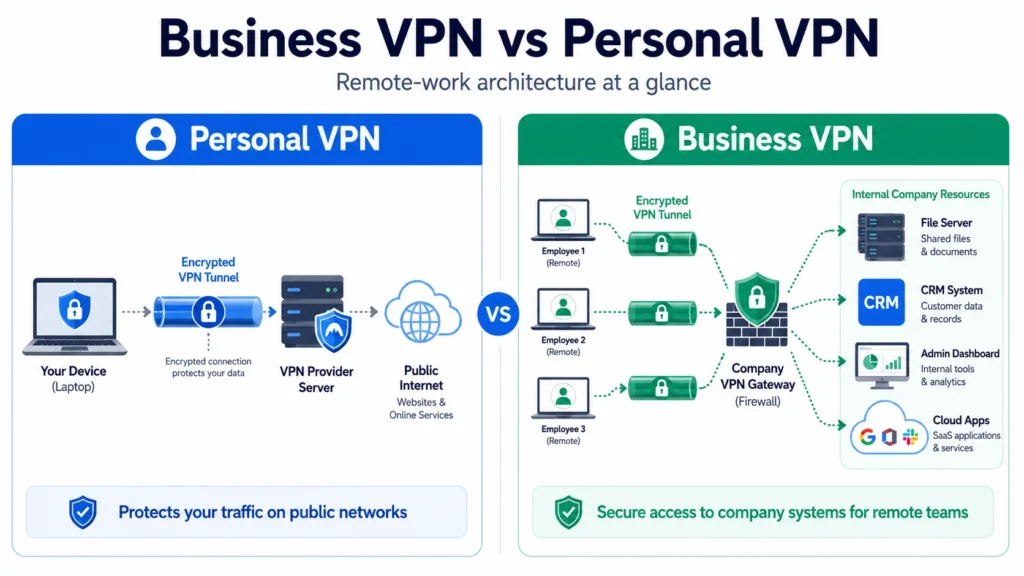
A personal VPN protects your connection from the network you are using. A business VPN controls who can reach company systems. They use similar tunnelling technology, but they solve different risks—and neither automatically replaces the other.
If you are a freelancer, a personal VPN is usually the relevant product. If you run a remote team with internal tools, central access control is the reason to choose a business VPN. Employees may need both: the company VPN for work resources and a personal VPN for private browsing on networks they do not control.
Reviewed: August 2026 · Reading time: about 14 minutes

At a glance
Business VPN vs personal VPN comparison
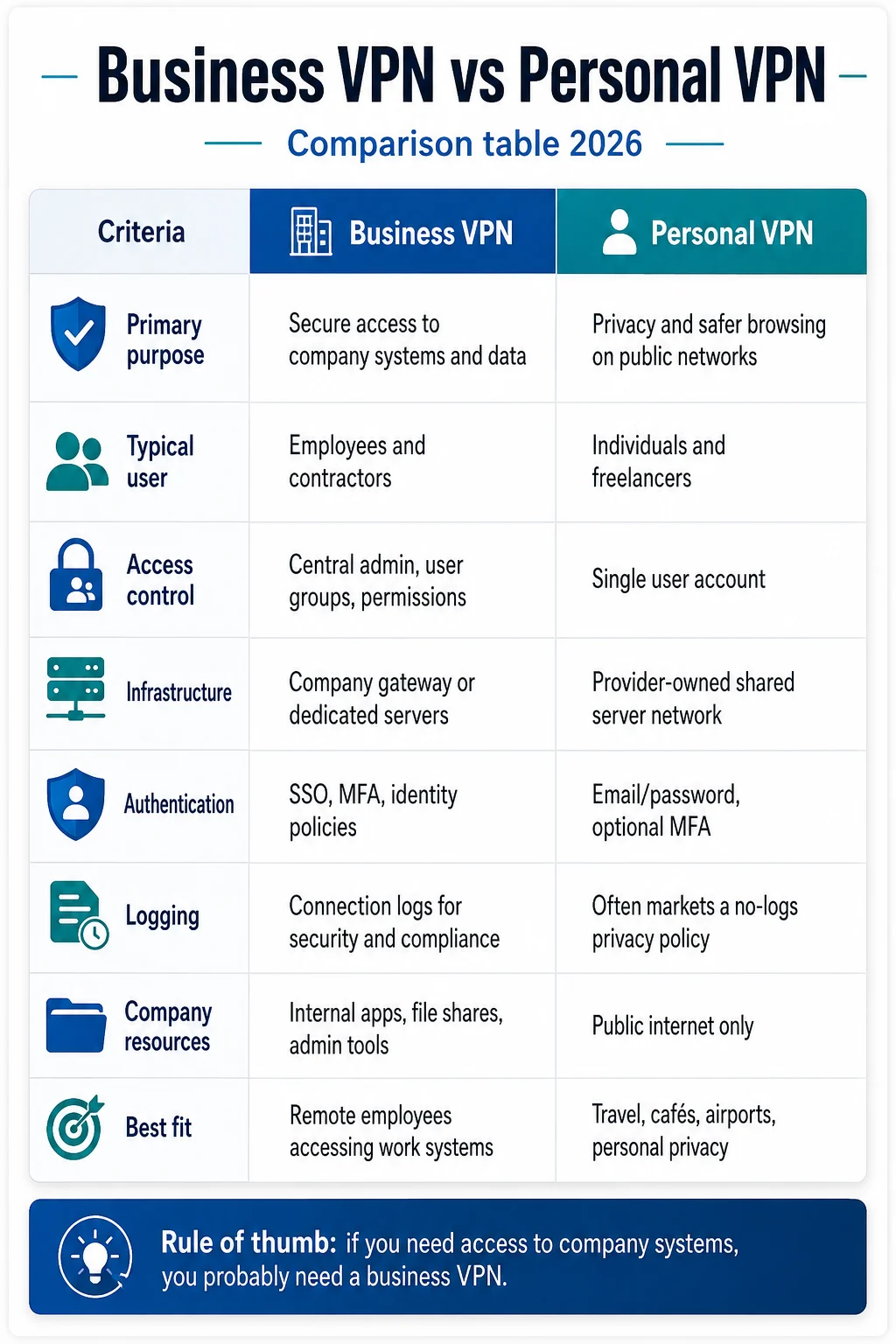
The clearest difference is ownership: the individual controls a personal VPN, while an organisation controls a business VPN.
| Criteria | Personal VPN | Business VPN |
|---|---|---|
| Primary job | Reduce network visibility and protect one person’s public-internet traffic | Control access to company systems and data |
| Who controls it | The individual | An IT administrator or business owner |
| Internal systems | Does not grant access | Dedicated gateways can provide controlled access |
| Administration | One account with user-selected settings | Central users, groups, policies and offboarding |
| Identity controls | Account password and optional MFA | May include SSO, SCIM and enforced MFA |
| Static IP | Sometimes sold as an add-on | Often used for allowlisting a company gateway |
| Logging goal | Minimise activity logging | Retain enough connection evidence for security and compliance |
| Typical buyer | Individual, freelancer or traveller | Founder, IT lead or security team |
The individual product
What a personal VPN does for remote work
A personal VPN routes a device’s traffic through an encrypted tunnel to a provider-operated server. The café, hotel, airport or ISP can see that a VPN connection exists, but the traffic inside the tunnel is encrypted. Websites see the VPN server’s IP address rather than the home or public-network IP.
That delivers three useful outcomes for a remote worker:
- Less visibility for the local network. DNS and destination traffic can be routed inside the tunnel instead of being exposed to the Wi-Fi operator.
- A different public IP. Websites receive the VPN server address, which reduces IP-based location exposure.
- A consistent safety layer. Auto-connect and a kill switch can reduce mistakes when moving between home, coworking and travel networks.
It does not put you inside your employer’s private network. Connecting to a consumer VPN server in London or New York will not unlock a company file share, staging environment or admin panel. For the practical network-safety side, use our guide to staying safer on public Wi-Fi.
The organisation product
What makes a business VPN different
A business VPN protects the organisation from unmanaged access. Instead of letting one person choose any provider server, it routes approved users through a company-controlled gateway. Internal tools can allowlist that gateway and reject traffic that arrives from anywhere else.
The tunnel is only part of the product. The administrative layer is what companies are paying for:
- Central user groups and permission policies
- Fast onboarding and immediate access revocation during offboarding
- Enforced multi-factor authentication and, on some plans, SSO or SCIM
- Dedicated gateway addresses for allowlisting internal tools
- Connection records for incident response and audit evidence
- Optional device checks before access is granted
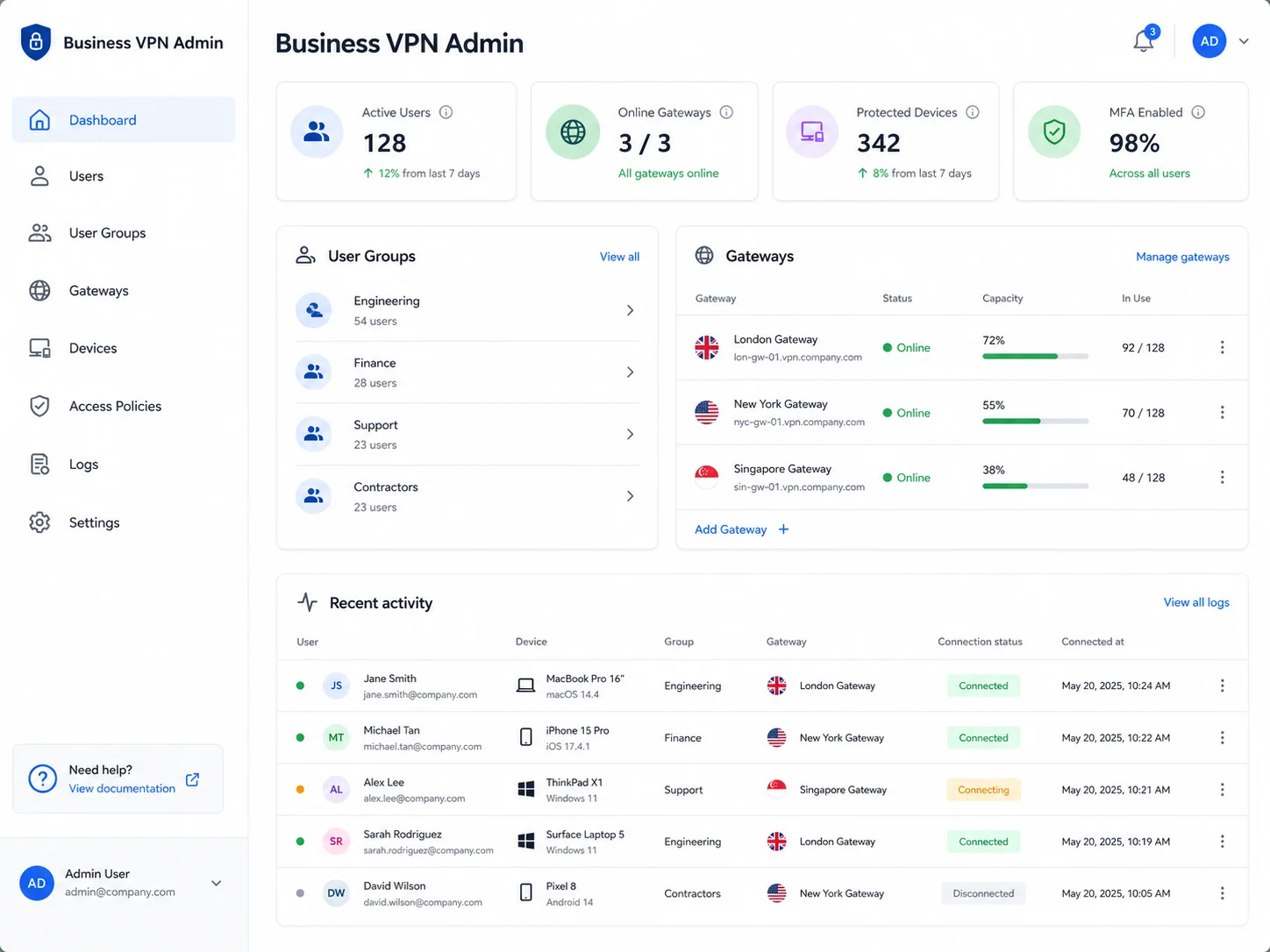
NordLayer and Proton VPN for Business are examples of this managed category. We do not link their product pages here because QuickVPNs has not verified that those B2B conversions are covered by the site’s consumer affiliate arrangements. That separation keeps every commercial VPN link on this page auditable.
Connection flow
How remote access works in practice
With a personal VPN, the sequence is simple: the app authenticates your subscription, creates an encrypted tunnel to a provider server and sends public-internet traffic through that server. The provider does not know whether a website is a company tool or a personal service; everything follows the routing rules selected in the app.
A managed business connection adds identity and policy before the tunnel becomes useful. The employee signs in with an approved company identity, completes any required MFA, and may have the device checked against rules such as operating-system version or disk encryption. Only then does the gateway grant access to the resources assigned to that user or group.
This distinction matters during incidents. If a freelancer loses a laptop, they can change a personal VPN password, but that does not revoke company accounts. If an employee leaves a managed organisation, an administrator can disable the identity and remove access centrally. The business control is not “stronger encryption”; it is a repeatable decision about who may reach which resource, from what device, under which conditions.
Small teams should therefore inventory resources before shopping. List every admin panel, database, file share, development environment and vendor dashboard that should not be open to the public. If the list is empty, a simpler team licence may be sufficient. If the list contains sensitive systems, central access is the requirement—not an optional premium feature.
The real trade-offs
Where the two VPN types diverge
Access to internal systems
Personal VPN: none. Its server is an exit point to the public internet, not a door into the employer’s private network.
Business VPN: this is the core function. A dedicated gateway and allowlisted IP can keep internal services off the open internet while still serving remote staff.
Who controls the configuration
Personal VPN: the user chooses the server, protocol, auto-connect rule and kill-switch settings. An employer cannot confirm that twelve individually purchased subscriptions are installed, enabled or removed when someone leaves.
Business VPN: an administrator sets the policy centrally. That control is essential for repeatable onboarding, incident response and offboarding.
Logging and privacy
A consumer VPN’s privacy case depends on minimising logs and supporting that claim with independent evidence. A managed business service has the opposite operational requirement: the employer needs connection metadata to investigate access and demonstrate that controls exist.
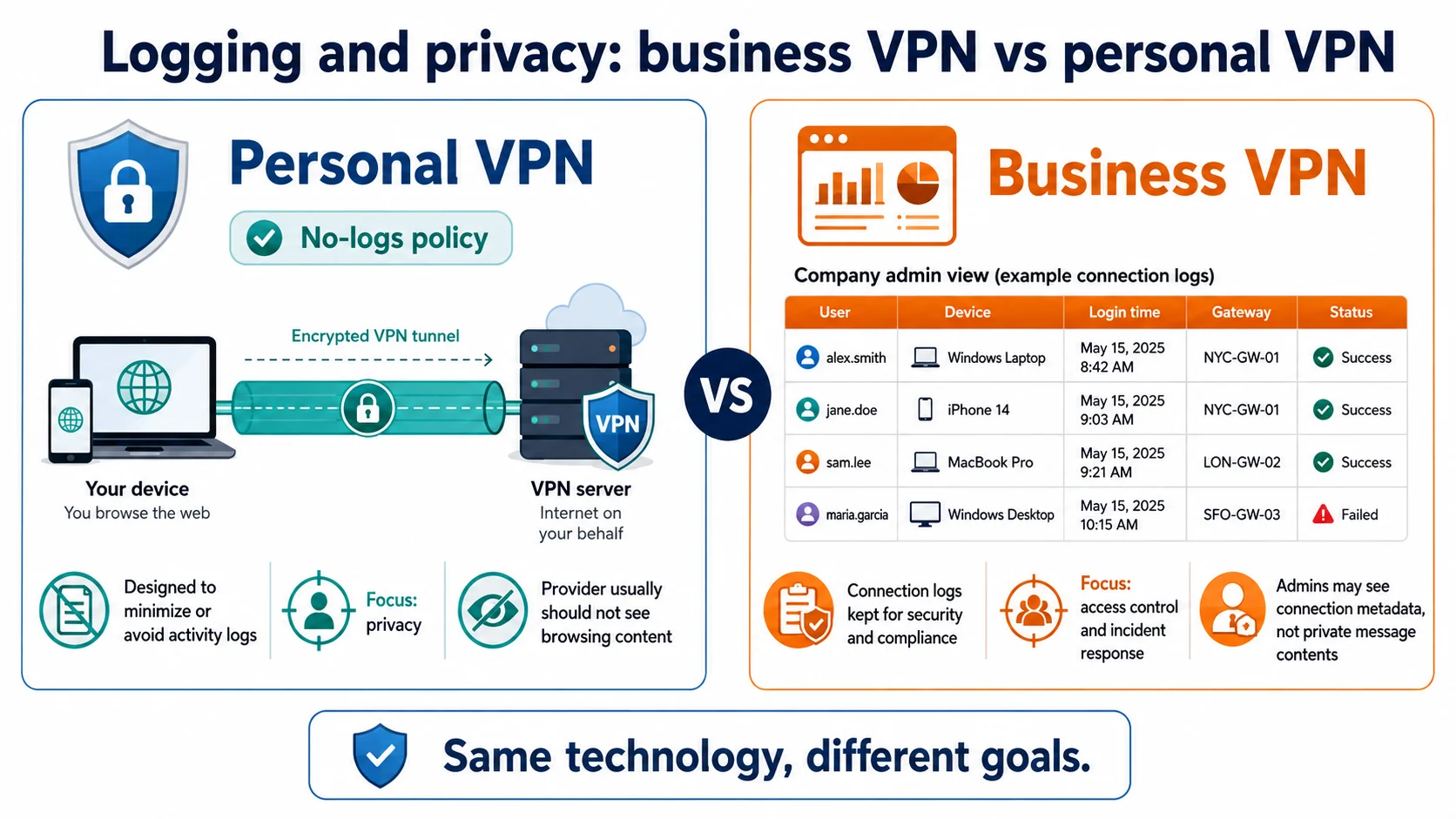
Employee takeaway: keep personal browsing off the corporate tunnel. Administrators may not see encrypted page contents, but connection timing, device, location and destination signals can be visible depending on configuration and policy.
Compliance and audit evidence
A pile of personal subscriptions cannot demonstrate that a team follows one access policy. A managed service can produce authentication records, policy settings, access revocations and device information. Proton’s published ISO 27001 certification is relevant organisational evidence, but it does not make every customer automatically compliant; the customer still has to configure and operate controls correctly.
Cost structure
Consumer plans are cheaper per person and often discounted for an introductory term. Business products cost more per seat because they add identity, management, gateways and support. Compare the cost with the problem solved: buying eight consumer licences is not a bargain if the actual requirement is controlled access to internal systems.
The middle ground
A team plan is not always a business-access VPN
Some consumer services add central billing and member invitations to the standard personal product. That can be useful for an agency, contractor group or small startup that wants everyone protected on home and public Wi-Fi. It is not the same as a private gateway that controls access to company systems.
Choose a team plan when
You need one invoice, simple member removal and personal-VPN protection, but have no private infrastructure to gate.
Choose business access when
You have internal tools, allowlisted services, regulated data, high turnover or an audit framework that requires evidence.
Surfshark’s team offering illustrates the first category: useful central licence handling around a consumer privacy product. It should not be confused with a zero-trust or remote-access platform.
Balanced view
Pros and cons for remote workers and teams
Personal VPN
- Low cost and quick setup
- Useful across home, cafés, hotels and airports
- Independent no-logs evidence is available from leading providers
- The individual controls the connection
- No access to company resources
- No central enforcement or offboarding
- No organisation-level audit trail
Business VPN
- Controlled access to internal systems
- Central users, groups and identity policy
- Immediate revocation when a worker leaves
- Evidence for security operations and audits
- Higher per-seat cost
- Requires an owner and ongoing configuration
- Less employee privacy on the managed connection
Decision path
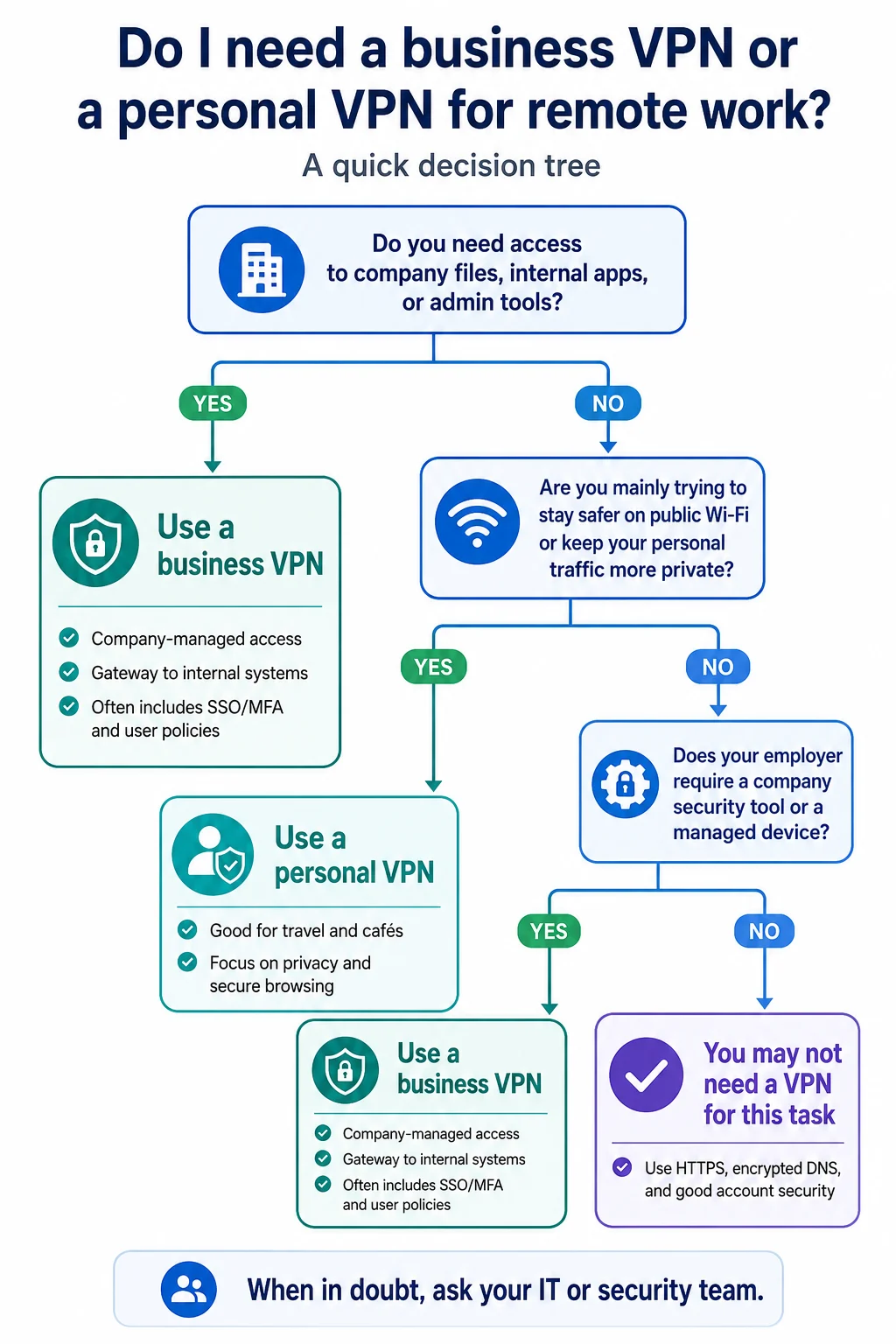
Which VPN do you need for remote work?
- Do you need company files, internal apps or admin tools? Use the organisation’s approved business VPN or access platform.
- Are you mainly protecting personal traffic on shared Wi-Fi? Use a personal VPN.
- Does your employer require a managed device or security client? Follow the employer’s policy; do not install a competing VPN without asking IT.
- Do you have neither internal resources nor untrusted-network risk? HTTPS, encrypted DNS, updates and good account security may be enough for that task.
Personal VPN shortlist
Three personal VPNs for remote workers
These are personal products—not substitutes for a company gateway. Choose according to your own devices, travel pattern and need for verifiable privacy.
All-round personal pick
NordVPN
NordVPN fits remote workers who want a mature personal service with broad platform support, threat-blocking tools and a long independent no-logs assurance history.
Why it fits
- Repeated no-logs assurance
- Kill switch and obfuscated options
- Broad app coverage
Limits
- Does not grant company-network access
- Device limit applies
- Renewal price exceeds many intro offers
Many devices or a small team
Surfshark
Surfshark’s unlimited simultaneous connections suit freelancers with many devices and households. Its team option can simplify licences, but it remains distinct from a company-access platform.
Why it fits
- Unlimited simultaneous connections
- Useful for device-heavy households
- Independent no-logs assurance
Limits
- Team billing is not a private gateway
- Feature parity varies by platform
- Renewal differs from the intro price
Privacy-first personal pick
Proton VPN
Proton VPN suits readers who value open-source apps, repeatable public evidence and a funded free plan with no data cap. The consumer plan is separate from Proton’s managed business offering.
Why it fits
- Open-source applications
- Independent no-logs audits
- Free tier for basic evaluation
Limits
- Free plan limits locations and devices
- Consumer account lacks company controls
- Secure Core adds latency
Worked examples
Three common remote-work scenarios
“My employer gave me a VPN”
Use it for work systems. A personal VPN may still make sense for your own browsing on public Wi-Fi, but keep the two roles separate.
“I am a freelancer”
If there is no private company network to reach, a business VPN adds little. Choose a personal service on evidence, device coverage and network conditions.
“I run a remote team of 12”
If the team uses internal tools, individual consumer subscriptions do not provide access control, verification or reliable offboarding. Evaluate a managed business service.
If the team travels often, compare the network-specific trade-offs in our best VPN for travel guide.
FAQ
Business and personal VPN questions
Do I need a VPN for remote work?
If the employer has internal systems, use its approved business VPN to reach them. A personal VPN is separately useful on public or shared Wi-Fi. On a trusted home network with no private company tools, you may need neither.
Can I use a personal VPN instead of my company’s VPN?
No. A personal VPN connects to the provider’s public server, not the employer’s private network. It cannot grant access to internal systems and may conflict with controls on a managed device.
Is a business VPN more secure than a personal VPN?
Not necessarily at the encryption layer. It is more capable organisationally because it can control access, enforce identity policy, revoke users and produce connection evidence.
Can my employer see my browsing on the company VPN?
Assume that connection timing, device, location and some destination information may be visible, depending on configuration. HTTPS normally protects page contents in transit, but personal browsing should stay off the corporate tunnel.
What is the cheapest way to cover a small remote team?
If there are no internal systems, a centrally billed team plan may be enough. If the company has private tools or compliance requirements, managed business access solves a different and more important problem.
Final verdict
Choose the VPN that matches the asset
Choose a personal VPN if you are a freelancer, solo remote worker, traveller or employee protecting personal traffic. Choose a business VPN when people must reach internal systems under one centrally enforced access policy. Choose a team plan only when you need central licences but no private gateway.
The decision is not “which VPN is stronger?” It is “whose traffic or systems are being protected, and who must control access?” Answer that first and the category becomes obvious.
Methodology
How we evaluated this comparison
We separated consumer privacy features from organisation-level access controls, then checked Provider Hub evidence for no-logs assurance, device limits, free-plan claims and Proton’s published ISO 27001 certification. We did not treat B2B product pages as affiliate destinations because their commercial terms have not been verified for this site.
Continue through the complete VPN Guides hub, browse Privacy & Security guides, learn how VPNs work, or use our VPN selection framework.