

The short answer
Best VPN for router: match the service to the router, not the other way around
NordVPN is the best all-round router VPN for most households because it has broad setup documentation and a large ecosystem of compatible routers. Surfshark is the best value when the goal is to cover many devices through one subscription. Proton VPN is the best privacy-first choice and documents modern WireGuard setups particularly well.
A router VPN protects every device that sends traffic through that router, including TVs, game consoles and smart-home hardware that cannot run a VPN app. The trade-off is control: one configuration affects the whole network, changing servers is slower, and a weak router can become the speed bottleneck.
The purchase decision therefore starts with hardware compatibility and processor capacity—not a provider’s server count. Most ISP-supplied routers cannot act as VPN clients. Some compatible models use OpenVPN only; newer routers can run WireGuard and usually deliver better throughput.
Decision map
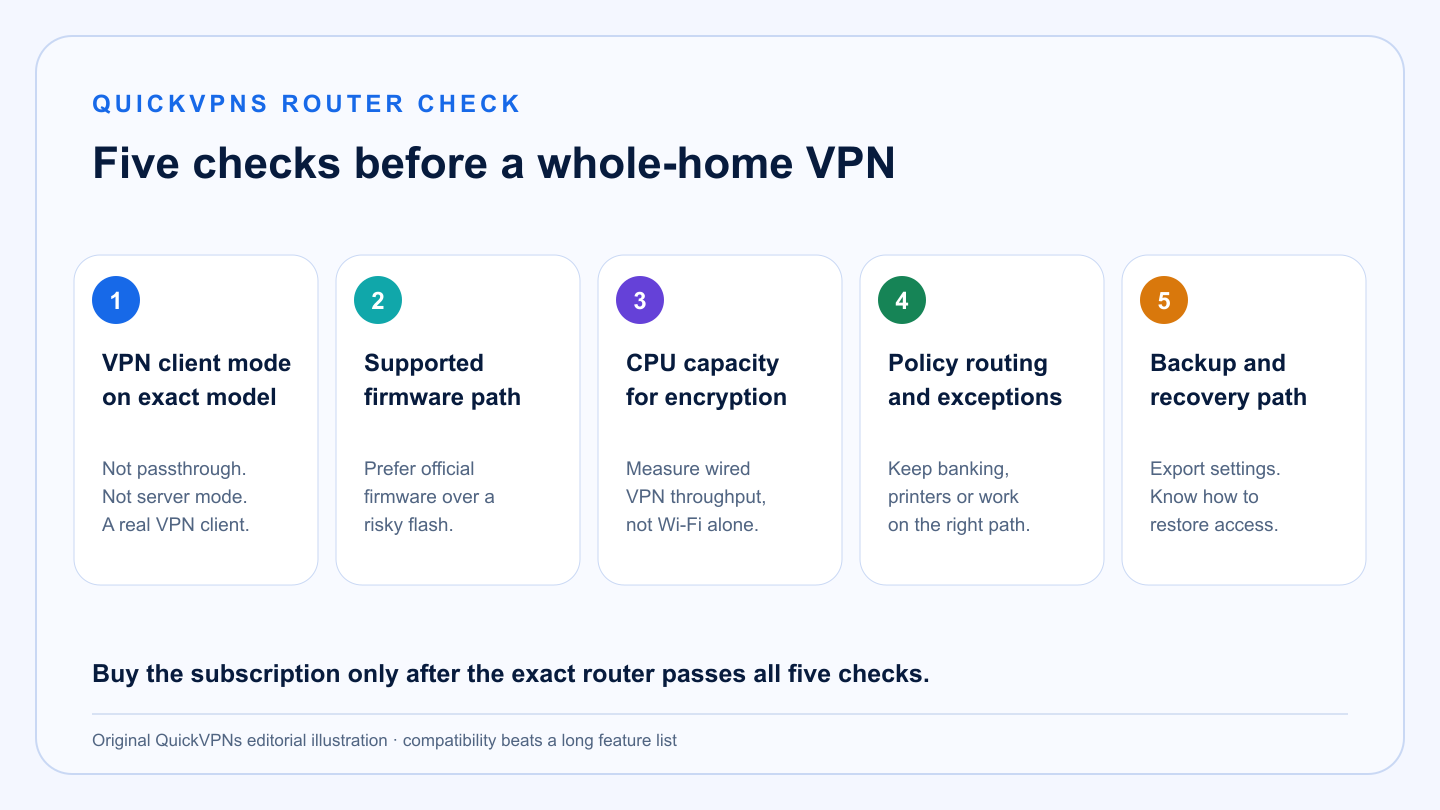
Five checks before you buy a router VPN
Client mode · firmware · processor · routing control · recovery
Fit first
Do you actually need a VPN on the router?
Router-level protection is useful, but it is not automatically better than installing apps.
A router VPN makes sense when
- You need to cover devices without native VPN apps.
- You want one always-on policy for a guest network or an entire household.
- Your router supports a modern VPN client and has enough CPU headroom.
- You are comfortable maintaining firmware and configuration backups.
Use device apps instead when
- Different family members need different countries at the same time.
- You frequently pause the VPN for banking, work or local devices.
- Your router supports only slow OpenVPN software processing.
- You want per-app split tunneling and the provider’s full feature set.
A practical hybrid is often best: put TVs and low-interaction devices on a VPN-enabled guest network, leave the primary network direct, and keep native apps on phones and laptops. That preserves control without forcing every device through one exit location.
At a glance
Router VPN comparison
Support depends on the exact hardware revision and firmware—not just the brand printed on the case.
| Criterion | NordVPN | Surfshark | Proton VPN |
|---|---|---|---|
| Best fit | Broad compatibility and guided setups | Whole-home value and many devices | Privacy-first modern configurations |
| Common protocols | OpenVPN; WireGuard on selected partner or custom setups | OpenVPN and WireGuard on supported firmware | OpenVPN and WireGuard |
| Manual setup burden | Medium | Medium | Medium to high |
| One router counts as | One VPN connection | One connection from an unlimited allowance | One VPN connection |
| Best differentiator | Documentation and compatible-router ecosystem | Value for device-heavy homes | Clear WireGuard and firewall documentation |
The shortlist
The best VPNs for routers and whole-home protection
Three credible choices, with the setup cost and limits made explicit.
Best all-round router VPN
NordVPN
NordVPN is the safest starting point for a household that wants broad router documentation and the option to buy preconfigured hardware. Official instructions cover AsusWRT, AsusWRT-Merlin, DD-WRT, OpenWrt, FreshTomato, pfSense, OPNsense, GL.iNet and several other platforms.
The limitation matters: many consumer Asus setups use OpenVPN rather than NordLynx. OpenVPN can be stable, but router throughput depends heavily on the processor. A fast internet plan does not guarantee fast encrypted traffic on entry-level hardware.
Strengths
- Broad official setup library
- Large preconfigured-router ecosystem
- One router covers devices that lack apps
- Good fit for streaming devices and consoles
Trade-offs
- NordLynx is not available on every router path
- Manual server changes take more work
- App-only features do not transfer to the router
- Performance is bounded by router hardware
Best value for device-heavy homes
Surfshark
Surfshark is the practical value pick for a household with many phones, computers and entertainment devices. Its unlimited device policy means the router does not consume a scarce slot, and individual apps can still run on devices that need a different location.
Official router guides cover OpenVPN and WireGuard on supported firmware. Surfshark also publishes an unusually useful unsupported-router list, which helps buyers reject incompatible ISP equipment before they subscribe. Treat that list as a starting point: model revisions and firmware versions still need separate verification.
Strengths
- Unlimited simultaneous connections
- OpenVPN and WireGuard setup material
- Clear unsupported-router guidance
- Good hybrid router-plus-app value
Trade-offs
- No app feature parity at router level
- Some ISP routers cannot run a VPN client
- Manual configuration can be intimidating
- Router CPU still determines real speed
Best privacy-first router option
Proton VPN
Proton VPN is the strongest privacy-led option for technically confident users. Its router documentation explains both OpenVPN and WireGuard, calls out the speed cost of router CPUs, and warns that changing servers is less convenient than in an app.
Compatible routes include AsusWRT, Merlin, DD-WRT, FreshTomato, GL.iNet, MikroTik, OpenWrt, OPNsense and pfSense. Proton also states that a router counts as one connection—even on its free plan—although free routing offers far less location control than a paid plan.
Strengths
- Detailed WireGuard setup guidance
- Open-source privacy ecosystem
- Strong firewall-platform documentation
- Router counts as one connection
Trade-offs
- More technical than a native app
- Server switching is manual
- Secure Core and app controls may not map cleanly to routers
- Free routing is not a substitute for full plan flexibility
Setup workflow
How to install a VPN on a router without breaking the network
Back up first, change one variable at a time, and keep a recovery path.
- Identify the exact model and hardware revision. A family name is not enough. Open the administration page and record the model, revision and installed firmware.
- Confirm VPN client mode. A router that can accept incoming work VPN connections is not necessarily able to send household traffic through a consumer VPN.
- Prefer native supported firmware. Flashing third-party firmware can add features, but a failed flash can make the router unusable and may affect the warranty.
- Export a configuration backup. Save the current router settings and note how to factory-reset or enter recovery mode.
- Create a test network first. Put one phone or laptop on a separate SSID, apply the VPN only there, and confirm DNS, public IP, speed and access to local devices.
- Measure wired and wireless speed. Compare no-VPN, nearby-server VPN and a distant location. If wired VPN speed is poor, the processor—not Wi-Fi—is probably the bottleneck.
- Plan exceptions. Banking, employer systems, printers and smart-home controllers may need direct routing. Use policy-based routing or a separate non-VPN network where supported.
Before checkout
Router VPN buying checklist
- The provider publishes a current guide for your exact firmware.
- The router supports a VPN client, not only VPN passthrough or a VPN server.
- The processor can encrypt near your required throughput.
- WireGuard is available if speed matters, or OpenVPN performance is documented.
- You can route selected devices outside the tunnel when necessary.
- You know how to restore the previous configuration.
- You have tested the setup during the refund window before committing to a long term.
Compare native-device coverage in our best VPN for multiple devices guide, browse the VPN Guides hub, or review how VPN routing changes visibility.
Practical answers
Best VPN for router FAQ
What is the best VPN for a router?
NordVPN is the best all-round option for most households because it supports a broad range of documented router setups. Surfshark offers stronger value for many devices, while Proton VPN is the privacy-first choice for technical users.
Can I put a VPN on any router?
No. The router must support VPN client mode and a protocol accepted by the provider. Many ISP-supplied routers do not. Check the exact model and firmware before buying a subscription.
Will a VPN slow down my router?
Usually. Encryption and longer routing add overhead, and consumer router CPUs can become the bottleneck. WireGuard often performs better than OpenVPN on compatible hardware, but measured speed matters more than protocol labels.
Does a router VPN protect every device?
It protects traffic from devices routed through the VPN tunnel. Devices on an excluded network, traffic sent outside policy rules, and activity beyond the VPN server are not covered by that router policy.
Is a router VPN better than VPN apps?
It is better for devices that cannot run apps and for an always-on household policy. Native apps are better for per-device locations, split tunneling, quick server changes and full access to provider features.
How we selected
Methodology and evidence
QuickVPNs compared current official setup libraries, protocol support, supported and unsupported firmware, connection accounting and the operational limits that appear after purchase. We weighted compatibility, recoverability and usable throughput above raw server totals.
We did not assume that every model from a supported brand works, or that a router can reproduce every feature in a desktop app. Router and firmware support changes; verify the exact hardware revision against the provider’s latest documentation before buying.
Our verification pass also checked whether each setup preserves a recovery route, supports selective routing, and documents what happens when a profile or endpoint fails. Readers should compare their exact hardware against the current setup page, record a no-VPN speed baseline, and test both wired and wireless traffic before the refund window closes. That makes the recommendation about a real household topology rather than a brand-level promise. Continue through the VPN Guides hub, browse router and device setup guides, or compare whole-home and native-app coverage.
Long-term fit
Check the maintenance burden, not only initial setup
We also reviewed profile replacement, server changes, firmware updates, local-device discovery and the ability to bypass the tunnel without disabling protection for everyone. These operational details matter more than a one-time successful connection because the router becomes shared household infrastructure. Record who can restore the router, where the configuration backup lives and how the household gets online if the VPN endpoint fails.